How to Open the Kia Niro Charging Port Fast and Simple
Opening the Kia Niro charging port is quick and easy once you know the right steps. This guide walks you through the exact process, common problems, and simple fixes so you can charge your Kia Niro without frustration. Whether you own the EV or PHEV version, you will find clear instructions, practical tips, and expert insights to make charging seamless.
Owning a Kia Niro comes with a lot of perks. It is fuel-efficient, reliable, and kind to the environment. But let us be honest, figuring out the Kia Niro charging port for the first time can feel a bit confusing. You walk up to your car, look for the charging door, and think, “Where exactly is it?”
Here is the good news. Opening the Kia Niro charging port is actually one of the simplest things you will do as an EV owner. Once you know where it is and how it works, it becomes second nature. This guide gives you every detail you need. From the exact location to step-by-step instructions, troubleshooting tips, and maintenance advice, we have got you covered.
Whether you just bought a Kia Niro EV or have been driving one for a while, this article will help you charge with confidence. No more guessing. No more fumbling around the front bumper. Just clear, simple instructions that work every time.
Key Takeaways
- Easy Access: The Kia Niro charging port is located on the front left fender and opens with a simple touch or remote command.
- Multiple Methods: You can open the port using the door handle, the key fob, or the infotainment screen.
- Common Issues: Ice, debris, or a dead 12V battery can prevent the charging port from opening, but these are easy to fix.
- Regular Maintenance: Keeping the port clean and lubricated helps avoid sticking and extends its lifespan.
- Home and Road Charging: The Kia Niro works with Level 1, Level 2, and DC fast charging stations for maximum flexibility.
- Safety First: Always ensure the car is parked and powered off before connecting the charging cable.
📑 Table of Contents
- Where Is the Kia Niro Charging Port Located?
- Step-by-Step Guide to Opening the Kia Niro Charging Port
- Common Problems When the Kia Niro Charging Port Won’t Open
- Tips for Maintaining Your Kia Niro Charging Port
- How to Charge Your Kia Niro at Home and on the Road
- Expert Tips for a Smooth Charging Experience
- Key Takeaways
- Conclusion
Where Is the Kia Niro Charging Port Located?
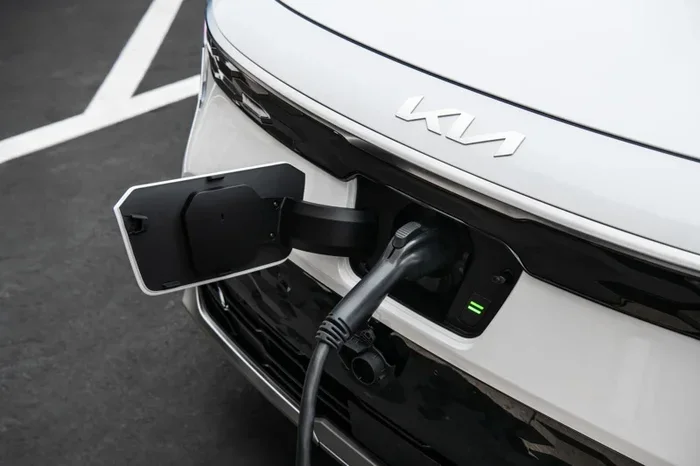
The Kia Niro charging port is on the front left side of the vehicle. If you are standing in front of your car, it sits on the left fender, right next to the front headlight. This placement is smart because it keeps the port protected and easy to access at most public charging stations.
Unlike some EVs where the charging port is hidden behind a door on the rear quarter panel, the Niro puts it right up front. This makes it very convenient for Kia Niro EV charging at home and on the road. You do not have to walk around to the back of the car every time you need to plug in.
The charging port door is part of the front bumper assembly. It has a subtle design that blends in with the rest of the bodywork. When the port is closed, it looks like a normal panel. But once you know what to look for, you will spot it instantly.
How to Identify the Charging Port Door
Here are a few visual cues that help you find the Kia Niro charge port quickly:
- Shape: The door is slightly recessed into the front fender area.
- Light: A small LED light on the door glows when the car is awake.
- Latching mechanism: The door clicks shut and sits flush with the bumper.
- Cable symbol: Some models have a small charging cable icon etched near the door.
Once you locate the port, you are ready to open it. Let us walk through the exact steps.
Step-by-Step Guide to Opening the Kia Niro Charging Port
Opening the Kia Niro charging port is straightforward. There are actually several ways to do it, which gives you flexibility depending on where you are and what you have handy. Below, we break down each method in detail.
Method 1: Using the Door Handle Touch Sensor
This is the most common way to open the port. The Kia Niro has a capacitive touch sensor on the front left door handle. Here is how it works:
- Park the car and make sure it is in Park mode.
- Walk up to the front left side of the vehicle.
- Touch the door handle sensor lightly with your hand. The car will recognize your approach.
- The charging port door will pop open automatically.
- Plug in the charging cable until you hear a click.
This method is super convenient because you do not need the key fob. The car senses your presence and responds. It is one of the reasons the Kia Niro EV charging experience feels so seamless.
Method 2: Using the Key Fob
If you are carrying the key fob, you can open the charging port from a distance. This is helpful when your hands are full or you are approaching the car in the dark.
- Press and hold the charging port button on the key fob.
- The port door will unlock and open.
- Connect the cable and start charging.
Not all key fobs have this button, so check your specific model. The newer fobs for the Kia Niro PHEV and EV models include a dedicated charging port icon. Just press it, and the door opens.
Method 3: Using the Infotainment Screen
The Kia Niro’s infotainment system gives you full control over the charging port. Here is how to use it:
- Start the car or turn the infotainment system on.
- Navigate to the EV settings menu.
- Look for the charging port option.
- Tap the button to open the port door.
This method is great when you are already inside the car and want to prepare the port before you connect the cable. It is also useful if the touch sensor on the door handle is not responding.
Method 4: Emergency Release Inside the Car
If the charging port door is stuck or the electrical system has an issue, there is a manual release. This is a small lever or tab located inside the front left footwell. Pull it, and the port door releases mechanically. This is a handy backup that every Kia Niro owner should know about.
Common Problems When the Kia Niro Charging Port Won’t Open
Sometimes, the Kia Niro charging port refuses to cooperate. This can be frustrating, especially when you are in a hurry to get charging. Let us look at the most common reasons this happens and how to fix each one.
Ice or Cold Weather Build-Up
Cold weather is the number one enemy of the charging port door. Ice can form around the latch and freeze the door shut. If you live in a cold climate, this is something you will encounter regularly.
Here is what to do:
- Do not force the door open. This can damage the latch or the surrounding bumper.
- Use the car’s defrost setting to warm up the front end.
- Wait a few minutes for the ice to melt naturally.
- Gently try opening the port again using the touch sensor or key fob.
Some owners find that applying a thin layer of silicone lubricant around the door seal helps prevent ice buildup. This simple trick keeps the port working smoothly even in freezing temperatures.
Debris or Dirt Around the Latch
Dirt, leaves, and small debris can get trapped around the charging port door. Over time, this gunk builds up and prevents the door from opening or closing properly.
To fix this:
- Inspect the area around the port with a flashlight.
- Use a soft brush or compressed air to clear away debris.
- Wipe the door seal with a damp cloth to remove any grime.
- Apply a small amount of silicone spray to keep the mechanism moving smoothly.
Keeping the port area clean is one of the easiest ways to prevent issues. It is also a great habit to get into, just like changing the cabin air filter or checking the tire pressure regularly.
Dead 12V Battery
The Kia Niro relies on a 12V battery to power many of its electronic systems, including the charging port door. If the 12V battery is dead or weak, the port may not open using the touch sensor or the infotainment screen.
Signs of a weak 12V battery include:
- The dashboard lights are dim.
- The infotainment system takes a long time to start.
- The key fob does not unlock the doors.
- The charging port door does not respond to any input.
If you suspect a dead 12V battery, try jump-starting the car. Once the battery has enough charge, the port should work normally. You can also use the manual release inside the footwell as a temporary workaround.
Software Glitch
Like any modern car, the Kia Niro runs on software. Occasionally, a software glitch can cause the charging port to behave oddly. The door might not respond, or it might open and close randomly.
A simple reset often fixes this. Turn the car off, walk away, and wait a minute. Then come back and try again. If the problem persists, a software update from the dealer may be needed.
Tips for Maintaining Your Kia Niro Charging Port
Proper maintenance keeps the Kia Niro charging port working flawlessly for years. Here are some simple tips every owner should follow.
Clean the Port Regularly
Dust, salt, and road grime can accumulate around the charging port. Wipe it down every few weeks with a soft, damp cloth. This prevents buildup that can interfere with the door mechanism.
Lubricate the Door Seal
A small amount of silicone-based lubricant on the door seal keeps the port opening and closing smoothly. Apply it every few months, especially before winter. This is a quick and easy task that makes a big difference.
Check the Cable Connection
A loose or damaged charging cable can cause problems at the port. Always inspect the cable connector before plugging it in. If the connector is bent or dirty, clean it gently with a dry cloth before use.
Avoid Force
If the port door is not opening, do not force it. Forcing the door can break the latch or damage the bumper. Instead, try the manual release or check for ice and debris first.
Protect the Port from Water
The Kia Niro charging port is designed to be water-resistant, but standing water can still cause issues. After washing your car or driving through a deep puddle, check the port area for excess moisture and dry it gently.
How to Charge Your Kia Niro at Home and on the Road
Now that you know how to open the port, let us talk about actually charging the car. The Kia Niro is compatible with several charging options, giving you plenty of flexibility.
Level 1 Charging at Home
Level 1 charging uses a standard household outlet. It is the slowest option but requires no special equipment. Just plug the Kia Niro charging cable into a regular wall outlet, and the car charges overnight. This is perfect for overnight charging if you drive short distances daily.
Level 1 charging adds about 3 to 5 miles of range per hour. It is not ideal for quick top-ups, but it works well for daily use.
Level 2 Charging at Home
Level 2 charging requires a dedicated 240-volt outlet, similar to what a dryer uses. This is the most popular home charging option for Kia Niro EV owners. A Level 2 charger fully charges the car in about 6 to 9 hours, depending on the battery size.
You can have a Level 2 charger installed in your garage or driveway. Many Kia Niro PHEV owners also prefer Level 2 because it provides faster charging and more convenience.
Public Charging Stations
When you are on the road, public charging stations are your best friend. The Kia Niro works with most standard public charging networks. Just find a station, pull up to the Kia Niro charging port, open the door using the methods we covered, and plug in.
DC fast charging is also available on select Kia Niro models. This can add significant range in just 30 to 40 minutes. It is perfect for road trips when you need to get back on the road quickly.
Before visiting a public station, make sure you have the right adapter. Most public stations use the standard J1772 connector for Level 2 charging, and CCS for DC fast charging. The Kia Niro comes with the necessary cables, but it is always good to double-check.
Expert Tips for a Smooth Charging Experience
Here are some insider tips that experienced Kia Niro owners swear by:
- Pre-condition the car: In cold weather, pre-condition the car while it is still plugged in. This warms the battery and improves charging efficiency.
- Set a charging timer: Use the infotainment system to schedule charging during off-peak hours. This can save money on your electricity bill.
- Keep the charging cable organized: Store the cable in the trunk when not in use. This prevents damage and keeps the car tidy.
- Monitor charging status: The infotainment screen shows real-time charging progress. Use it to track how much charge you are getting.
- Lock the car while charging: The car can be locked while plugged in. The charging cable stays connected, and the port door remains secure.
These small habits add up over time. They keep your Kia Niro EV charging experience smooth and stress-free. Think of them as part of your regular car care routine, just like checking the oil or rotating the tires.
Key Takeaways
- Easy Access: The Kia Niro charging port is located on the front left fender and opens with a simple touch or remote command.
- Multiple Methods: You can open the port using the door handle, the key fob, or the infotainment screen.
- Common Issues: Ice, debris, or a dead 12V battery can prevent the charging port from opening, but these are easy to fix.
- Regular Maintenance: Keeping the port clean and lubricated helps avoid sticking and extends its lifespan.
- Home and Road Charging: The Kia Niro works with Level 1, Level 2, and DC fast charging stations for maximum flexibility.
- Safety First: Always ensure the car is parked and powered off before connecting the charging cable.
Conclusion
Opening the Kia Niro charging port is something every owner should be able to do in seconds. Whether you use the door handle touch sensor, the key fob, or the infotainment screen, the process is simple and intuitive. With the step-by-step instructions in this guide, you now have everything you need to charge with confidence.
Remember, the Kia Niro EV charging experience is designed to be hassle-free. When you encounter a problem, the troubleshooting tips above will help you get back on track quickly. And with regular maintenance, your charging port will work smoothly for years to come.
So next time you pull into your garage or arrive at a public station, you will know exactly what to do. Open the port, plug in the cable, and let your Kia Niro get the energy it needs. Happy charging.
If you are interested in learning more about car maintenance and keeping your vehicle in top shape, check out our guide on Do You Have to Reset the Light After an Oil Change? It is a great companion piece for any Kia Niro owner who wants to stay on top of their car’s health.
Also, if you have ever wondered about DIY car repairs, our article on Can I Change the Brake Pads Myself? covers essential skills every car owner should know. And for those chilly mornings when ice is a problem, you might also find useful tips in our guide on How Long Does It Take to Fit a New Bumper? which covers common bumper-related repairs.
Frequently Asked Questions
Can I open the Kia Niro charging port without the key fob?
Yes, you can. The Kia Niro has a capacitive touch sensor on the front left door handle that opens the charging port without needing the key fob. You can also use the infotainment screen inside the car to open the port manually.
Why won’t my Kia Niro charging port open?
The most common reasons are ice buildup in cold weather, debris around the latch, or a weak 12V battery. Try using the car’s defrost setting to melt ice, clean the area around the port, or jump-start the 12V battery if needed.
How do I manually open the Kia Niro charging port?
There is a manual release lever inside the front left footwell. If the electrical system fails, pull this lever to release the charging port door mechanically. This is a useful backup method every owner should know.
Can I charge my Kia Niro at a public charging station?
Yes, the Kia Niro is compatible with most public charging stations. It supports Level 2 charging with the J1772 connector and DC fast charging with the CCS connector on compatible models.
How long does it take to charge a Kia Niro at home?
With Level 1 charging using a standard outlet, it takes about 24 hours for a full charge. With Level 2 charging using a 240-volt outlet, a full charge takes approximately 6 to 9 hours depending on the battery size.
Is it safe to leave the Kia Niro charging overnight?
Yes, it is safe. The Kia Niro has built-in safety features that stop charging once the battery is full. You can also set a charging timer through the infotainment system to charge during off-peak hours for added convenience and cost savings.