How to Program a Subaru Remote Start Fob the Easy Way
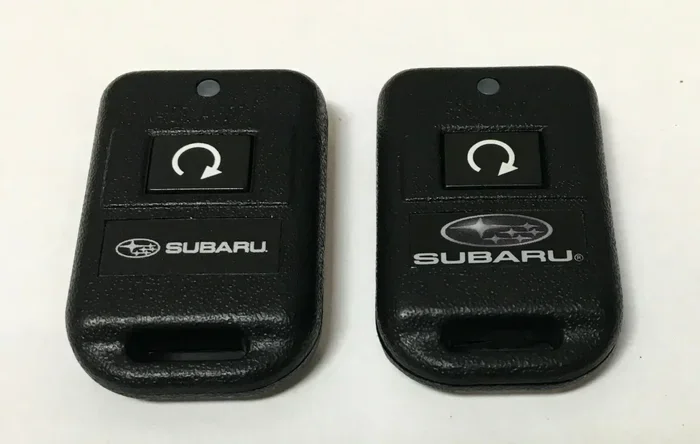
Programming your Subaru remote start fob is simpler than you think and can be done in minutes without visiting a dealer. This guide walks you through every step, from preparing your key fob to testing the remote start system, so you can enjoy cold-weather engine start convenience right away. Whether you own a Subaru Outback, Forester, or another model, these easy-to-follow instructions will save you time and money.
Programming a Subaru remote start fob might seem intimidating at first glance. But honestly, it is one of the easiest car tasks you can do on your own. You do not need any special tools or technical background. In fact, once you see how simple the process is, you will wonder why you ever considered paying a dealer to do it for you.
Many Subaru owners struggle with their remote start systems simply because they do not know the correct steps. The process varies slightly depending on your model year, but the core method remains the same across most vehicles. This guide breaks everything down into clear, manageable steps that anyone can follow.
Remote start technology has become a standard feature in newer Subaru models. It lets you warm up or cool down your car before you get in. On cold winter mornings, there is nothing quite like stepping into a heated Subaru with the windows already cleared. The convenience factor alone makes learning this process well worth your time.
Before you begin, make sure you have your key fob ready. You should also check that the fob battery is working properly. A weak battery can cause programming to fail, which leads to unnecessary frustration. If you are unsure about your battery, replacing it first is always a smart move.
Key Takeaways
- Quick Process: Programming your Subaru remote start fob takes just a few minutes using the onboard setup method.
- No Dealer Needed: You can reprogram your fob at home without paying for expensive dealership visits.
- Model Compatibility: The process works across most Subaru models including Outback, Forester, Legacy, and Crosstrek.
- Safety First: Always follow the correct ignition sequence and vehicle positioning to avoid errors.
- Battery Matters: A fresh CR2032 battery in your fob ensures a smooth programming experience.
- Aftermarket Options: If your Subaru didn’t come with remote start, an aftermarket kit can add this feature easily.
📑 Table of Contents
- Understanding Your Subaru Remote Start System
- Preparing to Program Your Subaru Remote Start Fob
- Programming Your Subaru Remote Start Fob Step by Step
- Common Programming Problems and Solutions
- Maintaining Your Subaru Remote Start Fob
- When to Seek Professional Help
- Benefits of Having a Programmed Remote Start Fob
- Final Thoughts on Programming Your Subaru Remote Start Fob
Understanding Your Subaru Remote Start System
Every Subaru remote start system works on a simple principle. The fob sends a signal to your vehicle’s computer. The computer then activates the engine without you being inside. This entire process happens in seconds and operates within a specific range, usually around 300 to 600 feet depending on your model.
How the Remote Start Fob Communicates
The fob uses a coded frequency to talk to your car. This code is unique to your vehicle, which is why you need to program it properly. When you press the remote start button, the fob sends a signal that the car’s security system recognizes. If the code does not match, the engine will not start. This is an important vehicle security feature that protects your car from theft.
Your Subaru’s push button start system works hand in hand with the remote fob. The car verifies that the correct fob is nearby before allowing the engine to crank. This means that even if someone copies your signal, the vehicle will not start without the matching fob code. Understanding this basic process helps you troubleshoot issues later on.
Which Subaru Models Support Remote Start
Most modern Subaru models come equipped with remote start capability. The Subaru Outback, Forester, Legacy, Crosstrek, and Ascent all support factory remote start systems. However, older models or base trims may not include this feature from the factory. In those cases, you can install an aftermarket remote start kit to add the functionality.
It is always a good idea to check your Subaru owner manual for specific details about your model. The manual will tell you whether your vehicle has the feature and what the exact programming steps are. Some models require a different button sequence than others, so confirming this beforehand saves you time.
Preparing to Program Your Subaru Remote Start Fob
Preparation is the most overlooked part of the programming process. Taking a few minutes to get everything ready makes the actual programming much smoother. You want to eliminate any potential obstacles before you start pressing buttons.
Step 1: Check Your Fob Battery
Start by checking the battery in your key fob. Most Subaru fobs use a CR2032 coin battery, which you can find at any grocery store or pharmacy. If the battery is low, the signal strength drops and programming may fail. Replacing the battery before you begin is a simple step that prevents headaches later.
To replace the battery, flip the fob over and locate the small notch. Use a flathead screwdriver or a coin to pop open the casing. Swap out the old battery with the new one, making sure the positive side faces up. Snap the casing back together, and you are good to go.
Step 2: Gather Your Vehicle Information
Next, gather any information you need about your vehicle. Know your model year and trim level. If you have the owner manual handy, keep it nearby. The manual often contains model-specific programming instructions that can be very helpful. You can also look up your vehicle identification number if you need to confirm features.
Make sure your car is parked in a safe, flat location. The parking brake should be engaged, and the transmission should be in park. These safety requirements are not optional, and skipping them can cause the programming sequence to fail or, worse, create a safety hazard.
Programming Your Subaru Remote Start Fob Step by Step
This is the core of the process. Follow these steps carefully and in the exact order listed. The sequence is designed to put your vehicle into programming mode, which allows the system to accept the new fob signal.
Step 1: Enter the Vehicle and Close All Doors
Sit in the driver’s seat and close all doors, including the trunk and rear hatch. Make sure all doors are fully latched. Some Subaru models will not enter programming mode if a door is open. This safety measure prevents accidental programming while someone is outside the vehicle.
Insert the key into the ignition or place the fob on the start button, depending on your model. For models with a traditional key, turn the ignition to the “On” position without starting the engine. For push-button start models, press the brake pedal and press the engine start button once without holding the brake.
Step 2: Activate Programming Mode
Now you need to activate the programming mode. For most Subaru models, you will press and release the lock button on the fob three times within five seconds. After the third press, the doors should lock and unlock to confirm that programming mode is active.
Some models require you to hold the lock button for a longer duration. Always refer to your specific model’s instructions. If you are unsure, the owner manual provides the exact sequence for your vehicle. You can also search online forums where Subaru owners share model-specific tips.
Step 3: Program the Fob
Once programming mode is active, press any button on the fob within 30 seconds. The doors will lock and unlock again to confirm that the fob has been accepted. This step links the fob’s unique code to your vehicle’s computer system.
If you are programming multiple fobs, repeat this step for each additional fob. The system typically accepts up to three or four fobs depending on the model. Make sure each fob is programmed individually and confirmed before moving to the next one.
Step 4: Exit Programming Mode
After programming all fobs, turn the ignition off or remove the fob from the proximity sensor. The doors will lock and unlock one final time to confirm that programming mode has been exited. Your remote start fob is now ready to use.
Test the fob by standing a few feet away and pressing the remote start button. The engine should start, and the dashboard lights should illuminate. If nothing happens, repeat the process from the beginning. Sometimes a second attempt resolves any minor issues.
Common Programming Problems and Solutions
Even when you follow the steps perfectly, things can sometimes go wrong. Here are the most common issues Subaru owners face when programming their remote start fob and how to fix them.
The Fob Does Not Respond During Programming
This usually means the fob battery is weak or dead. Replace the battery with a fresh CR2032 and try again. Make sure you are within the recommended proximity to the vehicle during programming. Standing too far away can weaken the signal and cause the car to miss the fob input.
The Doors Do Not Lock and Unlock to Confirm Programming Mode
If the doors do not respond, you may not have entered programming mode correctly. Double-check the button sequence for your specific model. On some Subaru models, you need to press the brake pedal while pressing the start button. Timing matters, so make sure you are pressing the buttons within the required time window.
The Remote Start Does Not Work After Programming
After successful programming, the remote start should work within seconds of pressing the button. If it does not, first check that the engine is off and the doors are closed. Then verify that you are within the remote start range. If the problem persists, try reprogramming the fob or checking the vehicle’s battery voltage.
Sometimes the issue is related to the vehicle security system. If your car has an active alarm or immobilizer, it may interfere with remote start functionality. In this case, disarming the system first and then attempting remote start can resolve the issue.
Maintaining Your Subaru Remote Start Fob
Once your fob is programmed and working, a little maintenance goes a long way. Proper care keeps your remote start system functioning reliably for years. These simple habits prevent most common problems before they start.
Replace the Fob Battery Regularly
Plan to replace your fob battery every one to two years, even if it seems to be working fine. A fresh battery ensures strong signal strength and reliable remote start performance. Keep a spare CR2032 battery in your glove box so you are never caught off guard.
Protect the Fob from Physical Damage
Your fob is a small electronic device that can be damaged by drops, moisture, or extreme temperatures. Avoid leaving it on the dashboard in direct sunlight during hot summer days. A fob protector case or keeping it in your pocket helps absorb shocks and protect the internal circuitry.
Keep Your Fob Clean
Dirt and grime can build up around the buttons and the key blade, making the fob harder to use. Wipe it down regularly with a soft, slightly damp cloth. Avoid using harsh chemicals that could damage the plastic casing or the buttons over time.
When to Seek Professional Help
Most programming tasks are straightforward and can be done at home. However, there are situations where professional help is the right choice. Knowing when to call a technician saves you time and prevents potential damage to your vehicle’s electrical system.
If you have tried programming your fob multiple times without success, a dealership or qualified locksmith can help. They have specialized diagnostic equipment that can identify deeper issues. This is especially true for older Subaru models where the key fob programming system may have developed faults over time.
Also consider professional help if you are installing an aftermarket remote start system. While these kits are designed for DIY installation, improper wiring can cause electrical problems. A professional installer ensures everything is connected correctly and safely.
It is also worth noting that if you recently purchased a used Subaru, the previous owner may have programmed multiple fobs. In this case, you may need to reprogram all fobs to sync with your new key. This process is slightly different from initial programming and may require dealer-level tools.
Benefits of Having a Programmed Remote Start Fob
Once your Subaru remote start fob is working, you will quickly see why this feature is so popular. The benefits go far beyond just convenience.
First, remote start lets you preheat or precool your car before you drive. On freezing winter mornings, your Subaru is already warm when you step outside. In summer, the interior is cool and comfortable before you even sit down. This small luxury makes a big difference in your daily routine.
Second, a programmed remote start fob adds a layer of security. You can start the engine and lock the doors from a distance. The vehicle security system remains active, meaning the car cannot be driven without the correct fob present. This gives you peace of mind whether you are at home or running quick errands.
Third, remote start can help extend the life of your engine. Allowing the oil to circulate and the engine to reach operating temperature before driving reduces wear and tear. Over time, this simple habit can contribute to better engine health and fewer mechanical issues.
Final Thoughts on Programming Your Subaru Remote Start Fob
Programming your Subaru remote start fob is one of those small tasks that makes a huge difference in your daily driving experience. The process is straightforward, takes only a few minutes, and requires no special equipment. By following the steps outlined in this guide, you can program your fob at home and enjoy the convenience of remote engine start right away.
Remember to keep your fob maintained, replace the battery regularly, and store it safely. These simple habits ensure your remote start system works reliably for years to come. If you ever run into issues that you cannot resolve, do not hesitate to consult your owner manual or seek help from a professional.
The next time you step out into a cold morning and press the button to start your Subaru from the warmth of your home, you will appreciate the effort you put into learning this process. Remote start convenience is one of those features that you never want to live without once you have it.
If you are new to working with your car’s systems, you might want to check out our guide on how to drive a car for beginners to build your confidence with basic vehicle operations. Understanding your car’s fundamentals makes tasks like fob programming much less daunting.
For any questions about your vehicle’s security features, you can also refer to our article on how to check if a vehicle is stolen for free to learn more about keeping your Subaru safe and secure.
Frequently Asked Questions
Can I program a Subaru remote start fob myself?
Yes, you can absolutely program a Subaru remote start fob yourself at home. The process is straightforward and does not require any special tools or professional assistance. Just follow the steps in your owner manual or this guide, and you will have your fob programmed in minutes.
How long does it take to program a Subaru remote start fob?
The entire programming process typically takes about 5 to 10 minutes. This includes checking the battery, entering programming mode, and confirming the fob is recognized by the vehicle. If you are programming multiple fobs, add a few extra minutes for each additional one.
What should I do if my Subaru remote start fob stops working after programming?
First, check the fob battery and replace it if needed. Next, make sure you are within the remote start range, which is usually around 300 to 600 feet. If the problem continues, try reprogramming the fob from scratch following the steps in this guide.
Do I need to reprogram my fob if I replace the battery?
No, replacing the fob battery does not erase the programming. The fob settings are stored in your vehicle’s computer, not in the fob battery itself. However, if you notice any issues after a battery change, reprogramming the fob is a quick and easy fix.
Can I program more than one remote start fob for my Subaru?
Yes, most Subaru models allow you to program up to three or four fobs. You simply repeat the programming process for each additional fob while the vehicle is in programming mode. Make sure each fob is confirmed and working before moving to the next one.
Is it possible to add remote start to a Subaru that did not come with the feature?
Yes, you can add remote start to any Subaru using an aftermarket kit. These kits are widely available and can be installed by a professional or a handy DIYer. Just make sure the kit is compatible with your specific Subaru model and year before purchasing.