Learn How to Reset the Oil Light on a Nissan Altima
Resetting the oil light on a Nissan Altima is a quick fix you can do at home in under five minutes. Whether you just changed your oil or the light came on too early, this guide walks you through the exact steps for every Nissan Altima model year. You will learn the button sequences, dashboard tricks, and Nissan Altima oil light reset methods that actually work.
This is a comprehensive guide about How to Reset the Oil Light on a Nissan Altima.
Key Takeaways
- Easy DIY Process: Resetting the oil light on a Nissan Altima requires just a few button presses on the dashboard or steering wheel controls.
- Model Year Matters: Different Nissan Altima years use different reset methods, so always check your specific model.
- Oil Life System vs. Oil Pressure Light: Understanding the difference helps you know whether the reset will actually solve the problem.
- Common Mistakes to Avoid: Skipping steps or holding buttons too long can cause errors, so follow each step carefully.
- When to See a Mechanic: If the light keeps coming back after a reset, there may be a deeper issue with your Nissan Altima oil system.
- Preventive Maintenance: Regular oil changes and proper reset procedures keep your Nissan Altima running smoothly for years.
[FEATURED_IMAGE_PLACEHOLDER]
How to Reset the Oil Light on a Nissan Altima
That little orange or yellow oil light on your dashboard can be really annoying. You just got your oil changed, or maybe you are way ahead of schedule, and yet the light is still staring at you every time you start the car. The good news is that resetting the oil light on a Nissan Altima is one of the easiest things you can do yourself. You do not need a mechanic, you do not need expensive tools, and you do not need to wait for a service appointment.
This guide covers every Nissan Altima model year from older generations to the latest 2023 and 2024 models. We will walk you through each method step by step so you can get that light off quickly and confidently. Whether your Nissan Altima uses a traditional gauge cluster or a modern digital display, we have you covered. Let us get into it.
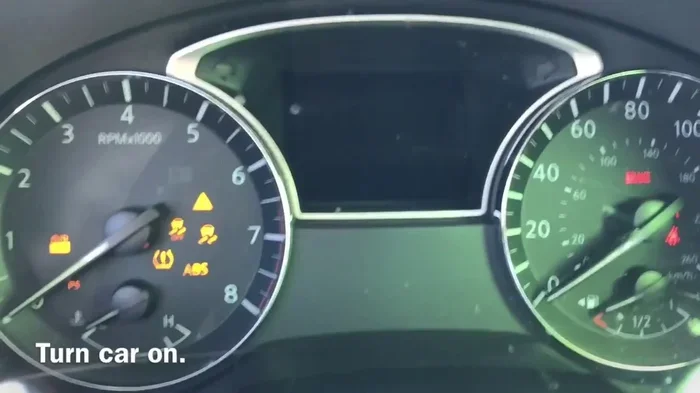
Before we start, it helps to understand what the oil light actually means. In most cases, the light is part of the oil life monitoring system . This system tracks your driving habits, engine temperature, and mileage to estimate when your oil needs changing. After an oil change, the system needs to be manually reset so it can start a fresh cycle. That is exactly what we are going to do here.
What You Will Need Before Starting
One of the best things about resetting the oil light on a Nissan Altima is that you need almost nothing. Here is a quick checklist of items that will make the process smooth:
- Your Nissan Altima key or push-start button access
- A fully charged battery (a dead battery will interrupt the process)
- Your owner’s manual (helpful but not required)
- A clean, flat surface to park on
- A few minutes of your time
That is it. No special equipment, no diagnostic scanners, and no trips to the dealership. If you have ever wondered how to reset the oil light on a Nissan Altima without spending a dime, you are in the right place.
Step-by-Step Oil Light Reset Methods by Model Year
The method you use depends heavily on what year your Nissan Altima was made. Nissan changed the dashboard and control layouts across different generations, so the reset process is not one-size-fits-all. Below we break down the methods by era.
Method 1: For 2007 to 2012 Nissan Altima Models
These older Altima models use a straightforward button-based reset system. Here is how to do it:
- Turn the ignition key to the ON position but do not start the engine.
- Press the accelerator pedal all the way down and hold it there.
- While holding the pedal, press and release the oil reset button on the dashboard.
- Wait for the oil light to flash, which means the system is resetting.
- Release the accelerator pedal and turn the ignition off.
- Start the engine to confirm the light is off.
This method works on most 2007 to 2012 Nissan Altima models. If the light does not turn off, try repeating the steps. Sometimes it takes two or three attempts for the system to register the reset.
Method 2: For 2013 to 2018 Nissan Altima Models
The 2013 through 2018 Altima models use a slightly different approach with the steering wheel controls and digital display:
- Press the START/STOP button to turn on the ignition without starting the engine.
- Use the steering wheel controls to navigate to the Maintenance menu on the dashboard display.
- Scroll down to the Oil Life System option.
- Press and hold the OK button for about five seconds until the display shows Reset.
- Release the button and turn the ignition off.
- Restart the engine and check that the oil light is gone.
This digital method is much cleaner than the older pedal approach. If you own a 2013 to 2018 Nissan Altima , this is the method you want to follow. It is quick, simple, and rarely causes any issues.
Method 3: For 2019 and Newer Nissan Altima Models
The latest Altima models come with even more advanced digital displays and infotainment systems. The reset process is very similar to the 2013 to 2018 method but with a few small differences:
- Press the engine start/stop button to access accessory mode.
- Tap the Settings icon on the touchscreen display.
- Navigate to Vehicle Maintenance or Service Information.
- Select Oil Life System and choose the Reset option.
- Confirm the reset when prompted.
- Turn the vehicle off and restart to verify the light is cleared.
Nissan also added a shortcut for some 2019 and newer models. You can use the steering wheel controls to scroll through the trip computer display and find the maintenance reset option directly. This is handy if you do not want to dig through menus.
Understanding the Oil Light vs. Oil Pressure Light
One of the most important things to know is that not every oil-related warning light means the same thing. People often confuse the oil change reminder light with the oil pressure warning light , and they are two very different signals.
Oil Change Reminder Light
This is the yellow or orange light that looks like an oil can with drops coming out of it. It is part of the Nissan Altima oil life monitoring system. This light simply tells you that the system thinks it is time for an oil change. Resetting this light after an oil change is perfectly normal and safe.
Oil Pressure Warning Light
This light is usually red and shaped like an oil can with a drip. It is a serious warning. It means your engine does not have enough oil pressure, which can cause severe damage if you ignore it. You should never try to reset the oil pressure light without first checking your oil level and pressure. If this red light comes on, pull over safely and check your oil immediately.
If you are unsure which light you are dealing with, check the color. Yellow or orange means oil change reminder. Red means oil pressure problem. Always address a red oil pressure light before attempting any reset.
Common Mistakes When Resetting the Oil Light
Even though resetting the oil light is simple, people still make mistakes that cause frustration. Here are the most common errors and how to avoid them.
Mistake 1: Not Turning the Ignition to the Right Position
Many people try to reset the light while the engine is running. This does not work for most Nissan Altima models. You need the ignition in the ON or accessory position, not the running position. Always start with the engine off and the key in the ON position.
Mistake 2: Releasing Buttons Too Early
The reset process requires holding buttons for a specific amount of time. If you let go too soon, the system will not register the command. Wait until you see the light flash or the display confirms the reset before releasing any buttons.
Mistake 3: Ignoring a Persistent Light
If you reset the light and it comes back within a day or two, something is wrong. The reset worked, but the underlying issue has not been resolved. This could mean low oil pressure, a faulty sensor, or an incomplete oil change. In this case, it is worth visiting a mechanic to check your Nissan Altima oil system.
Mistake 4: Using the Wrong Reset Method for Your Model Year
Nissan updated the reset process across different Altima generations. Using a method from a 2007 model on a 2020 model will not work, and vice versa. Always make sure you are following the steps for your specific model year.
How to Check Your Oil Level After Resetting the Light
Resetting the oil light is only half the job. You should also verify that your oil level is where it should be. Here is a simple process to check your oil on a Nissan Altima :
- Park the car on a flat surface and turn off the engine.
- Wait about two to three minutes for the oil to settle back into the pan.
- Open the hood and locate the oil dipstick.
- Pull the dipstick out, wipe it clean with a cloth or paper towel.
- Reinsert the dipstick fully, then pull it out again.
- Check the oil level against the minimum and maximum marks on the dipstick.
- If the oil is low, add the recommended oil type for your Nissan Altima model.
Checking your oil regularly is one of the best habits you can build. It takes less than two minutes and can prevent expensive engine damage. If you want to learn more about keeping your car running well, check out our article on how to prevent a car from overheating in summer for additional maintenance tips.
When to Visit a Mechanic Instead of Resetting the Light Yourself
Most of the time, resetting the oil light on a Nissan Altima is a simple DIY task. But there are situations where you should let a professional handle it. Here are the signs that something bigger is going on:
- The oil light comes back on immediately after a reset.
- You hear unusual knocking or ticking sounds from the engine.
- Your oil level drops rapidly between changes.
- The oil looks dark, gritty, or smells burnt.
- The red oil pressure light stays on instead of the yellow oil change light.
- You notice a burning smell or smoke from the engine area.
These symptoms could indicate low oil pressure, a failing oil pump, or internal engine wear. No amount of resetting will fix these problems. A qualified mechanic can run a proper diagnosis and get to the root of the issue.
For more information about understanding car warning lights and diagnostic codes, you might find our article on how to read ABS codes without a scanner helpful. It covers the basics of interpreting dashboard warnings on your own.
Tips to Keep Your Nissan Altima Oil System Healthy
Resetting the oil light is a quick fix, but long-term oil system health requires consistent care. Here are some practical tips to keep your Nissan Altima in great shape:
- Change your oil every 5,000 to 7,500 miles for conventional oil, or every 7,500 to 10,000 miles for synthetic oil.
- Use the oil grade recommended by Nissan for your specific Altima model year. Check your owner’s manual or consult a dealer.
- Replace your oil filter every time you change the oil. A clogged filter can reduce oil flow and trigger the warning light.
- Check for oil leaks under your car regularly. Puddles of oil on your driveway are a clear sign something needs attention.
- Monitor your oil pressure if your Altima has a digital gauge. A sudden drop in pressure is a red flag.
- Keep your engine cool by checking the coolant level and making sure the cooling system works properly. For more on this, read our guide on how to prevent a car from overheating in summer.
Taking care of your oil system pays off in the long run. A well-maintained engine lasts longer, runs smoother, and saves you money on costly repairs down the road.
Can the Oil Light Reset Itself?
Some car owners wonder if the oil light will eventually go away on its own. The short answer is no. The Nissan Altima oil life system is designed to remind you to service the vehicle. It will not turn off automatically after the mileage threshold is reached unless you manually reset it. The only exception is if you get an oil change at a dealership or service center, where the technician will reset it for you as part of the service.
If you are dealing with a Nissan Altima that also has questions about fuel type, you might be interested in our article on can a Nissan Altima use unleaded 88 gas. It covers fuel compatibility and helps you make the right choice for your engine.
Quick Tips for a Successful Oil Light Reset
Here are some quick, practical tips to make your oil light reset experience smooth and hassle-free:
- Always reset the light right after an oil change while you are still at the shop or garage.
- Make sure your battery is fully charged before starting the reset process.
- Write down your model year and the reset steps so you have them handy next time.
- If the digital display is unresponsive, try turning the ignition off and on again before retrying.
- Do not attempt to reset the light if the red oil pressure warning is active. Address the pressure issue first.
- Keep your owner’s manual in the glove box for quick reference on reset procedures.
These small habits save a lot of time and prevent unnecessary trips to the mechanic. A little preparation goes a long way when it comes to maintaining your Nissan Altima .
Conclusion
Resetting the oil light on a Nissan Altima is one of those simple car maintenance tasks that anyone can do. Whether you drive a 2007 model or a brand new 2024 Altima, the process is straightforward and takes just a few minutes. The key is knowing which method matches your model year, following the steps carefully, and making sure you are actually dealing with an oil change reminder rather than a serious oil pressure problem.
By staying on top of your oil changes and resetting the light properly, you keep your Nissan Altima running at its best. Regular maintenance is the single most important thing you can do to extend the life of your engine and avoid costly repairs. So the next time that oil light pops up, do not panic. Grab your keys, follow the steps in this guide, and get that light off your dashboard in no time.
Remember, if the light keeps coming back or you notice other warning signs, do not hesitate to visit a trusted mechanic. A little attention today can save you from big headaches tomorrow.
Frequently Asked Questions
How do I reset the oil light on a 2015 Nissan Altima?
For a 2015 Nissan Altima, press the START/STOP button to turn on the ignition without starting the engine. Use the steering wheel controls to navigate to the Maintenance menu on the display, scroll to Oil Life System, and hold the OK button for about five seconds until the system resets. Turn the ignition off and restart to confirm the light is gone.
Why does my oil light stay on after an oil change on my Nissan Altima?
The oil life monitoring system needs to be manually reset after every oil change. If you do not reset it, the light will stay on even with fresh oil. Follow the reset steps for your specific Altima model year to clear the reminder.
Can a dead battery prevent me from resetting the oil light?
Yes, a weak or dead battery can interrupt the reset process. Make sure your battery is fully charged before attempting to reset the oil light. If the dashboard display is dim or unresponsive, the battery may need to be recharged or replaced first.
Is it safe to drive with the oil light on?
It depends on which light is on. If it is the yellow oil change reminder, it is generally safe to drive for a short distance while you schedule an oil change. If it is the red oil pressure light, you should pull over immediately and check your oil level. Driving with low oil pressure can cause serious engine damage.
What oil type does a Nissan Altima need?
Most Nissan Altima models use 0W-20 synthetic oil, but you should always check your owner’s manual for the exact specification. Using the wrong oil type can trigger the oil light and potentially affect engine performance. You can also check our guide on whether a Nissan Altima can use unleaded 88 gas for more fuel-related information.
How often should I reset the oil light on my Nissan Altima?
You should reset the oil light every time you get an oil change. The oil life system tracks driving conditions and mileage, and it needs to be manually restarted after each service. This keeps the system accurate and ensures you stay on top of your maintenance schedule.