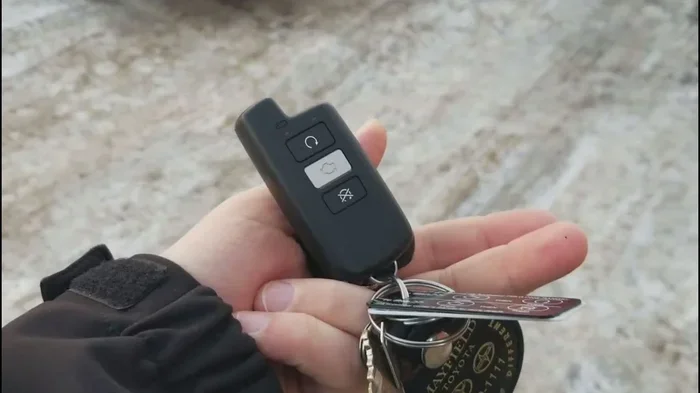
How to Use Toyota Remote Starter and Start in Seconds
The Toyota Remote Starter lets you start your vehicle from a distance, warming or cooling the cabin before you get inside. This guide covers everything from initial setup to advanced features, so you can use your Toyota Remote Starter with confidence. Whether you are dealing with cold mornings or hot afternoons, mastering your remote start system is easier than you think.
Key Takeaways
- Easy Setup: Programming your Toyota Remote Starter takes just a few simple steps using your key fob or the Toyota app.
- Comfort and Convenience: Remote starting lets you control cabin temperature and warm up the engine before you drive.
- Safety First: Always follow Toyota safety guidelines, including parking in well-ventilated areas and keeping the vehicle in park.
- Troubleshooting is Simple: Most common issues like a dead key fob battery or range problems have quick fixes.
- Model Compatibility Matters: Not all Toyota models come with remote start as standard, so check your specific trim and package.
- Maintenance Helps: Keeping your key fob battery fresh and your system updated ensures reliable performance over time.
📑 Table of Contents
- What Is a Toyota Remote Starter?
- How to Set Up Your Toyota Remote Starter
- How to Start Your Toyota Remotely
- Toyota Remote Starter Features and Functions
- Common Mistakes When Using a Toyota Remote Starter
- Quick Tips for Getting the Most Out of Your Toyota Remote Starter
- Expert Insights on Toyota Remote Start Systems
- Comparison: Factory vs. Aftermarket Toyota Remote Starters
- Conclusion
What Is a Toyota Remote Starter?
A Toyota Remote Starter is a system that lets you start your Toyota vehicle from a distance using your key fob or a smartphone app. Instead of sitting in a freezing car on a winter morning or baking in a hot parking lot, you can fire up the engine and let the climate control do its work. The system communicates wirelessly with your vehicle, sending a signal that triggers the ignition sequence safely.
Most newer Toyota models come equipped with this feature, especially in higher trim levels. However, some older or base models may not have it built in. If your Toyota does not have a factory remote start, you can often have an aftermarket system installed by a qualified technician. The convenience factor is huge, and once you start using it, you will wonder how you ever lived without it.
The Toyota Remote Starter works with your existing key fob or, in newer models, through the Toyota Smart Key system. You press a button or hold a button for a specific duration, and the vehicle responds. The engine starts, the doors remain locked, and the climate control activates based on your last settings. It is a seamless experience that adds real value to your daily driving routine.
How to Set Up Your Toyota Remote Starter
Setting up your Toyota Remote Starter is straightforward, but the exact steps vary depending on your model year and trim level. Below, we walk you through the general process for both factory-installed and aftermarket systems.
Step 1: Check Your Vehicle Compatibility
Before you begin, confirm that your Toyota model supports remote start. You can check your owner’s manual or look for the remote start button on your key fob. The button is usually marked with a circular arrow icon. If you do not see it, your vehicle may need an aftermarket installation.
Also, check whether your Toyota model requires a specific trim package to include remote start. For example, some Toyota Camry and RAV4 trims come with the feature standard, while base trims may not. If you are unsure, contact your Toyota dealer or check the vehicle specifications online.
Step 2: Program Your Key Fob
Programming your key fob for remote start typically involves a sequence of actions performed inside the vehicle. Here is a general outline:
- Sit inside the vehicle and close all doors.
- Turn the ignition to the “ON” position without starting the engine.
- Press and hold the remote start button on the key fob for three to five seconds.
- Turn the ignition off, then repeat the process if needed.
- Exit the vehicle and test the remote start from a safe distance.
For exact instructions, always refer to your Toyota owner’s manual. The manual provides model-specific programming steps that ensure you do not run into issues later.
Step 3: Download the Toyota App (If Applicable)
Many newer Toyota models support remote start through the Toyota app on your smartphone. Download the app from the App Store or Google Play Store, pair it with your vehicle, and follow the on-screen prompts. This gives you the ability to start your car from anywhere with a cellular or Wi-Fi connection. It is especially useful if you forgot to start the car before leaving home.
How to Start Your Toyota Remotely
Once your Toyota Remote Starter is set up, actually using it is simple. Here is how to do it step by step.
Using the Key Fob
To start your Toyota remotely with the key fob, follow these steps:
- Make sure you are within the programmed range of the vehicle (typically 100 to 300 feet).
- Press the lock button on the key fob to ensure the doors are secured.
- Immediately press and hold the remote start button (the circular arrow icon) for two to three seconds.
- The headlights will flash, and the engine will start. You will also see the parking lights activate.
- The climate control system will turn on based on your last settings.
Keep in mind that the vehicle will idle for a set period, usually 10 to 15 minutes, before shutting off automatically. If you want to extend the runtime, you can repeat the process while within range. However, most Toyotas limit the total remote start time to 20 or 30 minutes for safety reasons.
Using the Smartphone App
If your Toyota supports app-based remote start, the process is even more flexible. Open the Toyota app, make sure your phone is connected to the internet, and tap the remote start icon. The app will send a signal to your vehicle, and the engine will start just like it would with the key fob. You can monitor the vehicle status, lock and unlock doors, and even locate your car on a map through the app.
Starting the Vehicle After Remote Start
When you arrive at the vehicle, you simply get in, press the brake pedal, and press the engine start button as you normally would. The vehicle will recognize the key fob inside the cabin and allow you to drive. There is no need to do anything special other than follow your normal starting procedure.
Toyota Remote Starter Features and Functions
The Toyota Remote Starter comes loaded with features designed to make your life easier. Understanding these functions helps you get the most out of the system.
Climate Control Activation
One of the best features of the Toyota Remote Starter is the automatic climate control activation. When you remote start the vehicle in winter, the heater kicks on and warms the cabin before you step inside. In summer, the air conditioning cools the interior, making the car comfortable right away. This feature is a game-changer in extreme weather conditions.
Remote Lock and Unlock
Along with remote start, the key fob lets you lock and unlock the doors from a distance. This is handy when you are carrying groceries, loading luggage, or simply want to secure the vehicle quickly. The system keeps the doors locked while the engine is running remotely, adding a layer of security.
Vehicle Location and Status
Through the Toyota app, you can check your vehicle’s location, fuel level, and overall status. This is particularly useful in large parking lots or when you are trying to find your car in a crowded area. The app also sends notifications if the vehicle detects any issues, such as a low battery or an open door.
Security and Anti-Theft Integration
The Toyota Remote Starter works hand-in-hand with the vehicle’s existing security system. When the car is remotely started, the alarm remains active. If someone tries to tamper with the vehicle, the alarm will sound and the engine will shut off. This built-in protection gives you peace of mind every time you use the feature.
Common Mistakes When Using a Toyota Remote Starter
Even though the Toyota Remote Starter is user-friendly, some common mistakes can cause problems. Here are the ones to watch out for.
Forgetting to Put the Vehicle in Park
The remote start system requires the vehicle to be in park. If you accidentally leave it in gear, the system will not start the engine. Always make sure the gear selector is in “P” (Park) before walking away from the vehicle.
Ignoring Key Fob Battery Life
A weak key fob battery is the number one reason remote start fails. If you notice the range shrinking or the remote start not working, replace the battery. A standard CR2032 battery is usually all you need, and swapping it out takes less than a minute.
Using Remote Start in Enclosed Spaces
Never use the remote starter in a closed garage. The exhaust fumes contain carbon monoxide, which is dangerous and potentially lethal. Always park in an open, well-ventilated area before using the remote start feature. This is a critical safety rule that everyone should follow.
Exceeding the Remote Start Time Limit
Most Toyota models limit the total remote start duration to prevent engine damage. If you try to extend the runtime too many times in a row, the system may lock you out temporarily. Let the vehicle shut off on its own and wait a few minutes before trying again.
Not Checking for System Updates
If you use the Toyota app for remote start, make sure the app and your vehicle’s software are up to date. Toyota occasionally releases updates that improve performance and fix bugs. Ignoring updates can lead to connectivity issues or unexpected behavior.
Quick Tips for Getting the Most Out of Your Toyota Remote Starter
Here are some practical tips to help you use your Toyota Remote Starter more effectively:
- Pre-set your climate preferences: Before you leave the vehicle, set the temperature to your desired level. The system will remember this setting and apply it the next time you remote start.
- Use the remote start 10 minutes before you leave: This gives the engine time to warm up and the cabin to reach a comfortable temperature.
- Keep the key fob away from metal objects: Metal can interfere with the signal. Keep the fob in a pocket or bag for best results.
- Replace the key fob battery annually: Do not wait until it dies. A proactive replacement schedule keeps the system running smoothly.
- Learn your vehicle’s specific range: Different Toyota models have different remote start ranges. Knowing yours helps you determine how far away you can be.
- Use the lock button first: Always lock the doors before remote starting. This ensures the vehicle is secure while the engine runs.
Expert Insights on Toyota Remote Start Systems
According to Toyota service technicians, the remote start system is one of the most reliable features in the modern Toyota lineup. However, they emphasize the importance of proper maintenance and correct usage. Here are some expert tips gathered from Toyota dealerships and certified mechanics.
Keep the key fob clean: Dirt and debris can block the buttons and prevent the remote start signal from sending properly. Wipe down the fob regularly with a soft, damp cloth.
Check the hood latch: Before remote starting, make sure the hood is fully closed and latched. An open hood will prevent the system from starting and may trigger a warning light on the dashboard.
Understand the temperature sensors: The Toyota Remote Starter uses external temperature sensors to determine when to activate the climate control. In extremely cold weather, the system may default to maximum heat to warm the cabin quickly. In hot weather, it will prioritize cooling.
For more details on Toyota-specific remote start capabilities, you can also check whether you can remote start your Toyota with the key fob for model-specific guidance.
Comparison: Factory vs. Aftermarket Toyota Remote Starters
When your Toyota does not come with a factory remote start, you have the option of installing an aftermarket system. Here is a quick comparison to help you decide.
| Feature | Factory Remote Start | Aftermarket Remote Start |
|---|---|---|
| Integration | Seamless with Toyota systems | May require additional wiring |
| App Support | Full Toyota app compatibility | Varies by brand and model |
| Warranty | Covered under Toyota warranty | Separate warranty from installer |
| Cost | Included in vehicle price | $200 to $500 for installation |
| Reliability | High, factory-tested | Depends on installer quality |
| Range | Up to 300 feet | Typically 100 to 500 feet |
For most Toyota owners, the factory-installed system is the best choice because it integrates perfectly with the vehicle’s electronics and safety features. However, if you have an older model without remote start, a quality aftermarket system from a reputable installer can still deliver excellent results.
Conclusion
The Toyota Remote Starter is one of the most convenient and practical features available in modern Toyota vehicles. It saves you time, keeps you comfortable, and adds a layer of security to your daily routine. By following the setup steps, using the system correctly, and avoiding common mistakes, you can enjoy the full benefits of remote starting your Toyota.
Remember to keep your key fob battery fresh, park in safe and ventilated areas, and take advantage of the Toyota app for even more control. Whether you are battling a cold winter morning or a scorching summer afternoon, your Toyota Remote Starter has you covered. Start using it today and experience the difference it makes in your daily drive.
Once your car is warmed up and ready to go, make sure you know how to drive a car for beginners so you can hit the road safely. And if you want to explore more Toyota features, check out whether you can switch to sport mode while driving a Toyota for a more dynamic driving experience.
Frequently Asked Questions
How do I know if my Toyota has a factory remote starter?
Check your owner’s manual or look for the remote start button on your key fob. The button is usually marked with a circular arrow icon. You can also check your vehicle’s trim level and package details, as remote start is typically included in higher trims or optional convenience packages.
Can I remote start my Toyota from far away?
Yes, the Toyota Remote Starter has a range of approximately 100 to 300 feet depending on your model. If you use the Toyota app, the range extends as long as you have a cellular or Wi-Fi connection, allowing you to start the vehicle from virtually anywhere.
How long can I leave my Toyota running with the remote starter?
Most Toyota models allow the engine to idle for 10 to 15 minutes during a remote start cycle. After that, the engine shuts off automatically. You can restart the cycle if you are still within range, but total runtime is usually limited to 20 or 30 minutes to protect the engine.
Is it safe to remote start my Toyota in cold weather?
Yes, remote starting in cold weather is safe and actually recommended by Toyota. It allows the engine oil to warm up and circulate before you drive, reducing wear on engine components. Just make sure you park in a well-ventilated area and never use remote start in an enclosed space like a garage.
What should I do if my Toyota Remote Starter is not working?
First, check the key fob battery and replace it if needed. Make sure the vehicle is in park and all doors are closed. If the issue persists, consult your Toyota owner’s manual for troubleshooting steps or visit a Toyota service center for professional diagnosis.
Can I install a remote starter myself?
While aftermarket remote start kits are available for DIY installation, it is highly recommended to have a professional install the system. Proper wiring and integration with your Toyota’s electronics require expertise, and incorrect installation can void warranties or cause electrical issues.