Why Is My Phone Suddenly Not Connecting to My Car Anymore
Your phone suddenly not connecting to your car can be frustrating, but the most common causes are simple Bluetooth glitches, outdated software, or minor settings conflicts. Whether you use Apple CarPlay, Android Auto, or basic Bluetooth pairing, this guide walks you through every likely culprit and proven fix to get your phone and car back in sync quickly.
You hop in your car, tap your phone against the dashboard, and nothing happens. No music. No navigation. No hands-free calls. It is a moment that catches almost every driver off guard. One minute everything works perfectly, and the next, your phone suddenly not connecting to your car feels like a modern-day mystery.
The good news is that this problem is almost always fixable. Whether you rely on Bluetooth streaming, Apple CarPlay, Android Auto, or a simple USB cable, the reasons behind sudden disconnections tend to follow a few predictable patterns. This guide breaks down every common cause and gives you clear, step-by-step solutions you can try right now.
You do not need to be a tech expert to work through these fixes. Most solutions take just a few minutes and require nothing more than your phone and a little patience. Let us get your connectivity back.
Key Takeaways
- Bluetooth glitches are the #1 cause: A simple reset of both devices fixes most sudden disconnection problems.
- Software updates matter: Outdated phone or car firmware is a hidden reason phones stop connecting to car systems.
- Check your settings first: Bluetooth visibility, background app permissions, and battery saver modes can all block connections.
- Hardware issues exist: Damaged USB ports, faulty cables, or aging car Bluetooth modules need professional attention.
- Unpair and repair: Removing the old pairing and starting fresh solves stubborn connectivity issues in most cases.
- Know when to seek help: If basic fixes fail, a dealership or auto electrician can diagnose deeper electrical or module problems.
📑 Table of Contents
Why Your Phone Suddenly Stops Connecting to Your Car
Sudden disconnection between your phone and car system is more common than you might think. It happens to Android users and iPhone users alike, across every car brand and model year. Understanding the root cause is the first step toward a permanent fix.
Bluetooth Interference and Signal Problems
Bluetooth works on a specific radio frequency, and it is not immune to interference. Other wireless devices, metal objects, or even a crowded radio band can disrupt the signal between your phone and car. If your car Bluetooth suddenly stops working, interference is often the hidden culprit.
Common sources of Bluetooth interference include:
- Other Bluetooth devices inside the car
- USB 3.0 ports that emit wireless noise
- Metal phone cases that block the signal
- Physical obstructions between the phone and car antenna
- Nearby Wi-Fi networks operating on the same band
Sometimes simply moving your phone to a different location in the car restores the connection. Try placing it on the dashboard or in a cup holder closer to the infotainment screen.
Software Glitches After Updates
Phone and car software updates are meant to improve things, but they sometimes introduce new bugs. After a major iOS or Android update, users frequently report that their phone will not connect to car Bluetooth. The new software may change how wireless connectivity is handled, creating a mismatch with the car’s system.
Similarly, car infotainment systems receive updates too. If your car recently updated its firmware and your phone has not, the two systems may no longer communicate properly. This device compatibility gap is one of the most overlooked reasons for sudden disconnection.
Battery Optimization and Background Restrictions
Modern smartphones are aggressive about saving battery. Both iOS and Android include power-saving features that can quietly shut down background apps and wireless services. If your phone’s battery saver mode is on, it may be blocking the Bluetooth connection to your car without you noticing.
Android users should check if the car’s companion app is being restricted. Go to Settings, then Battery, and look for any apps that are being put to sleep. iPhone users should check Low Power Mode and ensure Bluetooth is not being disabled automatically.
Bluetooth Troubleshooting Steps That Actually Work
Before you try anything complicated, start with these fundamental troubleshooting steps. Most people fix their connection issues within five minutes using these methods.
Step One: Toggle Bluetooth Off and On
This sounds too simple, but it works more often than you would expect. Swipe down from the top of your screen and tap the Bluetooth icon to turn it off. Wait ten seconds, then turn it back on. This refreshes the Bluetooth module and forces your phone to search for available devices again.
On your car side, turn the infotainment system off and back on. If your car has a dedicated reset button, hold it for ten seconds. This clears temporary glitches in the car’s Bluetooth module.
Step Two: Remove and Re-Pair Your Phone
If toggling Bluetooth does not work, the next step is to delete the old pairing from both devices. On your phone, go to Bluetooth settings, find your car, and select Forget Device. On the car side, navigate to the Bluetooth settings and remove your phone from the paired devices list.
Once both sides are clean, start fresh. Turn on Bluetooth on your phone, make it visible, and search for new devices from the car’s infotainment screen. Select your phone and enter the PIN if prompted. This phone pairing process often resolves stubborn connection issues.
Step Three: Restart Both Devices
A full restart clears temporary memory and resets all wireless connections. Power off your phone completely, not just put it to sleep. For the car, turn the ignition off, wait thirty seconds, and start it again.
This simple step resolves the issue for a surprising number of drivers. It gives both systems a clean slate to establish a fresh connection.
Step Four: Check for Interfering Devices
Do you have a Bluetooth headset, smartwatch, or another device connected to your phone? These can sometimes interfere with the car connection. Temporarily disconnect all other Bluetooth devices and try connecting to the car again.
Also, if you recently added a new USB device or accessory to your car, it might be causing a conflict. Unplug everything except your phone and test the connection.
Software and Compatibility Issues
When basic troubleshooting fails, the problem often lies deeper in software or compatibility. Understanding these issues helps you target the right fix.
Update Your Phone Software
Go to your phone’s settings and check for any pending software updates. Both Apple and Google regularly release patches that fix Bluetooth and connectivity bugs. Installing the latest version can resolve sudden disconnection problems caused by known software flaws.
For iPhone users, go to Settings, General, and Software Update. For Android users, check Settings, System, and Software Update. Even if your phone says it is up to date, try checking again — sometimes updates roll out in stages.
Update Your Car Infotainment System
Many car owners do not realize their vehicle’s software can be updated. Check your car’s manual or visit the manufacturer’s website to learn how to update the infotainment system. Some brands offer over-the-air updates, while others require a visit to the dealership.
Keeping your car’s firmware current ensures smartphone integration continues to work smoothly. Outdated car software is one of the most common reasons for connectivity issues between phones and vehicles.
Check App Permissions and Settings
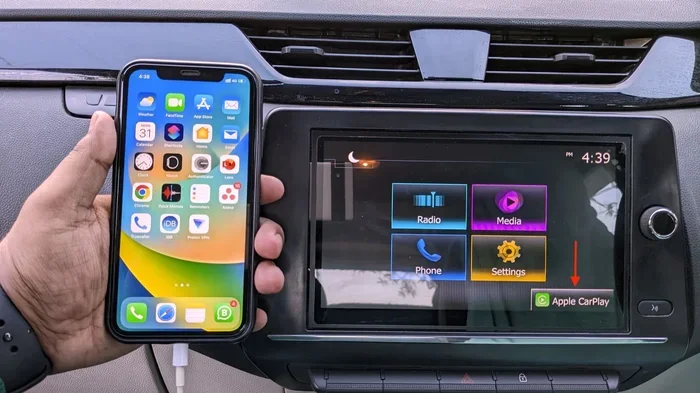
If you use Apple CarPlay or Android Auto, those apps need specific permissions to function properly. Make sure CarPlay or Android Auto has access to Bluetooth, location, and background activity.
For Apple CarPlay, go to Settings, General, and CarPlay. Make sure your car is listed and enabled. For Android Auto, open the app and check that it has all necessary permissions in your phone’s settings.
Factory Reset the Car Infotainment System
If software conflicts persist, a factory reset of the car’s infotainment system can help. This wipes all settings and paired devices, giving you a completely clean start. Check your car’s manual for the exact reset procedure, as it varies by manufacturer.
Be aware that a factory reset will also erase saved radio stations, navigation favorites, and other personal settings. Write down anything important before proceeding.
Hardware Problems That Cause Connection Failures
Not every connection problem is software-related. Sometimes the issue is physical, and no amount of restarting or resetting will fix it.
Damaged USB Ports and Cables
If you connect your phone via USB for CarPlay or Android Auto, a damaged cable or port is a frequent cause of failure. Frayed cables, bent connectors, or corroded ports can prevent a stable connection. Try a different cable and a different USB port in your car to rule this out.
Not all USB cables are created equal. Some charge-only cables lack the data pins needed for smartphone integration. Use a cable that is specifically rated for data transfer, preferably one from a reputable brand.
Aging Bluetooth Module in the Car
Car Bluetooth modules have a lifespan. In older vehicles, the Bluetooth hardware may simply be wearing out. If your car is more than seven or eight years old and connection problems are getting worse, the Bluetooth module itself might need replacement.
This is a more expensive fix, but it is worth knowing about if you have ruled out all software causes. An auto electrician can test the Bluetooth module and advise whether replacement is necessary.
Phone Hardware Issues
Rarely, the problem is on the phone side. A damaged Bluetooth antenna or wireless chip inside your phone can prevent connections. If your phone also struggles to connect to other Bluetooth devices like headphones or speakers, the phone’s hardware might be at fault.
Try connecting your phone to a different car or Bluetooth device. If it fails there too, the issue is likely with the phone itself rather than the car.
Quick Fixes That Work in Minutes
Sometimes you need a fast solution and do not have time for deep troubleshooting. Here are quick fixes that resolve most sudden disconnection problems.
Clear the Bluetooth Cache
On Android phones, go to Settings, Apps, find the Bluetooth Share app, and clear its cache and data. This removes corrupted temporary files that can block connections. On iPhone, you must reset all settings, which clears the Bluetooth cache along with other settings.
Forget All Paired Devices and Start Over
Go into your car’s Bluetooth settings and delete every paired device, not just your phone. Then do the same on your phone. This clears any lingering conflicts between devices and gives you a completely fresh start.
Turn Off Wi-Fi While Driving
Wi-Fi and Bluetooth can compete for the same wireless resources. Turning off Wi-Fi while driving can sometimes restore a stable Bluetooth connection to your car. Many drivers find this trick solves the problem immediately.
Disable Battery Saver Mode Temporarily
Turn off battery saver or low power mode on your phone and test the connection again. If the phone connects successfully, you know the battery optimization settings were blocking the connection. Adjust those settings to allow Bluetooth to work in the background.
When to Seek Professional Help
Most connection issues resolve with the troubleshooting steps above. But if you have tried everything and your phone still will not connect, it is time to bring in a professional.
Visit your car dealership if your vehicle is still under warranty. They can run diagnostic tests on the infotainment system and Bluetooth module at no cost. For older vehicles, a trusted auto electrician can test the Bluetooth hardware and recommend repairs or replacements.
If the problem is isolated to your phone, a visit to the manufacturer’s service center or a reputable repair shop can identify hardware faults. In some cases, a simple antenna replacement fixes the issue entirely.
Preventing Future Connection Problems
Once you get your phone and car connected again, a few simple habits can prevent the problem from returning.
- Keep both your phone and car software up to date
- Avoid using damaged or cheap USB cables
- Restart your phone and car system weekly
- Remove old paired devices that you no longer use
- Keep your phone’s Bluetooth cache clear
- Store your phone in a consistent location in the car
These small habits take minimal effort but save you from the frustration of sudden disconnection in the future.
Conclusion
When your phone suddenly not connecting to your car, the cause is almost always one of a handful of common issues. Bluetooth interference, software glitches, outdated firmware, battery restrictions, or hardware faults are the usual suspects. By working through the troubleshooting steps in this guide, you can identify the problem and restore your connection quickly.
Start with the simplest fixes — toggle Bluetooth, restart both devices, and remove old pairings. If those do not work, move on to software updates and cache clearing. Hardware issues are less common but still worth considering if nothing else resolves the problem.
The key is not to panic. This is a fixable problem, and you have all the tools to solve it right now. Get back on the road with your music, navigation, and hands-free calling working exactly as they should.
Frequently Asked Questions
Why did my phone stop connecting to my car Bluetooth all of a sudden?
Sudden Bluetooth disconnection is usually caused by a software glitch, interference, or a settings change. Try toggling Bluetooth off and on, restarting both devices, and removing the old pairing before creating a fresh connection. If that does not work, check for software updates on both your phone and car system.
Can a phone case block Bluetooth connection to my car?
Yes, some phone cases, especially thick metal or magnetic ones, can interfere with Bluetooth signals. Remove the case temporarily and test the connection. If it works without the case, switch to a thinner or non-metallic case that does not block wireless signals.
How do I reset Bluetooth on my car?
Most cars allow you to reset the infotainment system by holding the power button for ten to fifteen seconds. Some models require you to disconnect the car battery briefly. Check your car’s manual for the specific reset procedure. After resetting, re-pair your phone from scratch.
Is it normal for Bluetooth to disconnect when I start my car?
It should not be normal. Your phone should automatically reconnect to the car when you start the engine. If it does not, the auto-connect feature may be disabled, or there could be a software conflict. Check your Bluetooth settings on both devices to ensure auto-connect is turned on.
Does updating my phone fix car connection problems?
Yes, phone updates often include patches for Bluetooth and connectivity bugs. If your phone has not been updated recently, install the latest version and test the connection again. Similarly, updating your car’s infotainment software can resolve compatibility issues with newer phones.
What should I do if only one phone connects but not another?
This usually points to a settings issue on the phone that will not connect. Check that Bluetooth is enabled, visibility is turned on, and the phone is not restricted by battery optimization. Try unpairing and re-pairing the problematic phone, and make sure it is not connected to another device that might be causing a conflict.