How to Start a Hyundai Tucson With a Key The Easy Way
Starting a Hyundai Tucson with a key is simple once you know the right steps. This guide covers the full ignition process, common problems, and easy fixes for both traditional and smart key models. Whether you have a dead battery or a stuck key, you will find everything you need to get your Tucson running.
There are few things more frustrating than standing in front of your vehicle, ready to go, and realizing the key will not turn. The Hyundai Tucson is a reliable and popular SUV, but like any car, its ignition system can sometimes give you trouble. Whether you are dealing with a dead key fob battery, a locked steering wheel, or an unfamiliar starting process, this guide will walk you through everything you need to know.
How to Start a Hyundai Tucson With a Key does not have to be complicated. In fact, once you understand the basics, it is a simple process that takes just a few seconds. This article covers every scenario you might face, from a brand-new key to a stubborn ignition. You will learn step-by-step instructions, common problems, quick fixes, and preventive tips that will keep your Tucson starting smoothly every single time.
We have broken this guide into easy-to-follow sections so you can find exactly what you need. No matter your experience level with cars, you will find the information clear and practical. Let us dive in and get your Hyundai Tucson started the right way.
Key Takeaways
- Know your key type: Understanding whether you have a traditional key or a smart key makes all the difference.
- Follow the right steps: The ignition process is straightforward once you know the sequence.
- Check the battery first: A dead key fob battery is the most common reason for start-up failure.
- Don’t ignore warning signs: Strange clicking or no response means it is time to investigate.
- Keep spare keys ready: Always have a backup key fob or mechanical key on hand.
- Regular maintenance helps: Simple care steps can prevent most key-related problems.
📑 Table of Contents
Understanding the Hyundai Tucson Key System
Before you try to turn that key, it helps to understand what you are working with. Hyundai has used different key systems across various Tucson model years, and knowing which one you have makes the process much easier. The key system is the heart of your vehicle’s starting mechanism. Without it, the engine simply will not turn over.
Types of Keys Used in Hyundai Tucson Models
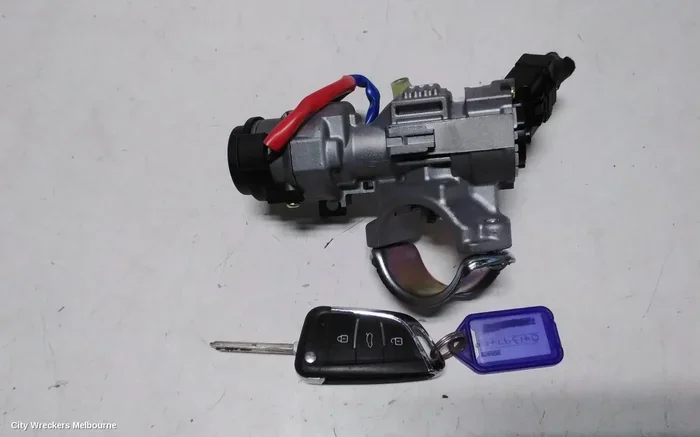
Hyundai has equipped the Tucson with several key types over the years. Older models from before 2015 typically use a traditional mechanical key with a metal blade. You insert this key directly into the ignition cylinder and turn it to start the engine. It is a simple, reliable system that has been around for decades. These traditional keys do not have any electronic components. They work purely through the physical cuts on the blade matching the pins inside the ignition cylinder.
Newer Tucson models, especially from 2015 onward, often come with a smart key system. This is also called a proximity key or keyless entry system. The key fob communicates wirelessly with the car using radio frequency signals. You can start the engine by pressing a button on the dashboard, as long as the fob is inside the vehicle. The system detects the fob’s location and allows the start sequence only when the fob is in the cabin. However, you can still use the physical key blade hidden inside the fob if the battery dies or the system malfunctions.
Some Tucson models also include a transponder key. This type of key has a small chip embedded in the plastic head. The chip sends a unique coded signal to the car’s immobilizer system. If the signal does not match the code stored in the vehicle’s computer, the engine will not start, even if the key physically fits the ignition. This is an anti-theft feature that keeps your Tucson secure from theft attempts. Understanding which type of key you have is the first step toward solving any starting problem.
How the Hyundai Tucson Ignition System Works
The ignition system in a Hyundai Tucson is designed to be both convenient and secure. When you insert the key or place the smart fob inside the cabin, the car recognizes the signal. The immobilizer verifies the key’s authenticity by checking the coded signal against its database. Once verified, the engine control unit allows the fuel pump to prime and the spark plugs to fire.
In traditional key models, turning the key activates the starter motor. This motor cranks the engine until it fires up on its own. The starter motor draws a large amount of electrical current from the battery to spin the engine over. In smart key models, pressing the start button sends an electrical signal to the starter relay, which performs the same function. Both systems rely on a healthy battery, a working starter motor, and a properly coded key to function correctly.
If any part of this chain fails, you will not be able to start the car. This is why understanding each component helps you troubleshoot problems faster. For instance, if you have ever wondered about starting a car without any key at all, you can check out this guide on how to start an ignition without a key for additional insights and alternative methods.
How to Start a Hyundai Tucson With a Key
Now that you understand the key system, let us get into the actual starting process. Whether you have a traditional key or a smart key fob, the steps are straightforward. Follow along carefully, and you will have your Tucson running in no time.
Step-by-Step Starting Process for Traditional Key Models
Starting a Hyundai Tucson with a traditional key is a simple mechanical process. Here is exactly what to do:
- Enter the vehicle and sit in the driver seat. Make sure the key is in your hand or pocket. Remove any extra keys or objects from your pocket that might interfere with the key insertion.
- Insert the key fully into the ignition cylinder. The cylinder is located on the right side of the steering column. Push the key in until you feel it seat completely. If the key does not go in easily, do not force it. Check that you are using the correct key.
- Turn the key to the ON position. This is the first click or position. You should see the dashboard lights up. The fuel pump will prime, and the gauges will activate. Wait about three seconds for the systems to initialize. This brief pause is important because it allows the fuel system to pressurize before the engine cranks.
- Turn the key to the START position. This is the second click, and it will feel slightly different from the ON position. Hold the key in this position for no more than five to ten seconds. The engine should fire up. You will hear the starter motor engage and then release once the engine starts.
- Release the key once the engine starts. The key will automatically return to the ON position. Let the engine idle for a few moments before driving. This allows the oil to circulate and the engine temperature to stabilize.
If the engine does not start on the first try, do not keep turning the key for more than ten seconds at a time. Wait about fifteen seconds between attempts to let the starter motor cool down. Repeated cranking without pauses can overheat the starter and cause damage. If the engine still does not start after three attempts, step back and check for other issues before trying again.
Step-by-Step Starting Process for Smart Key Models
Starting a Hyundai Tucson with a smart key is even simpler. Here is the process:
- Enter the vehicle with the smart key fob on your person. The car must detect the fob to allow starting. The system uses antennas located throughout the cabin to sense the fob’s proximity. Make sure the fob is in your pocket, purse, or bag.
- Press the brake pedal firmly with your foot. This is a safety requirement for push-button start systems. The vehicle will not start unless the brake pedal is fully depressed. This prevents accidental starts while the car is in gear.
- Press the ENGINE START/STOP button. The button is located on the dashboard near the steering column. Press it once and hold for a moment. You should see the dashboard lights change and hear the engine turn over.
- The engine should start. The dashboard lights will change, and you will hear the engine turn over. Release the button once the engine is running. The indicator light should change from red to green or stay solid, confirming the engine is active.
If the smart key battery is low, the system may not detect the fob. In this case, you can use the hidden mechanical key blade to start the Tucson. There is usually a small slot or cover near the start button where you can insert the physical key as a backup. For more information on driving when your key battery is low, check out this helpful resource about driving with a low key battery and what to expect.
Common Problems When Starting a Hyundai Tucson With a Key
Even with a straightforward system, things can go wrong. Understanding the most common problems helps you diagnose issues quickly and decide whether you can fix them yourself or need professional help. Most starting problems fall into a few clear categories, and each has a recognizable set of symptoms.
Dead Key Fob Battery
A dead key fob battery is the number one reason people cannot start their Hyundai Tucson. The smart key system relies on a small coin-cell battery inside the fob to transmit its signal. When this battery dies, the car cannot recognize the key, and the push-button start will not work. This is the most common and easiest problem to fix.
Signs of a dead key fob battery include:
- The push-button start does not respond when you press it
- The dashboard shows a key warning light or message
- The keyless entry remote stops working or has reduced range
- You have to be very close to the start button for the car to detect the fob
- The fob buttons feel less responsive or require more pressure than usual
If your key fob battery is dead, you can still start the Tucson using the hidden mechanical key blade. Most smart key fobs have a small release button or slider that lets you extract the physical key. Insert this key into the backup slot near the start button to start the engine. For a step-by-step guide on replacing the battery yourself, check out this resource on replacing a car key fob battery yourself at home.
Replacing the battery is easy and inexpensive. You need only a small flathead screwdriver and a new CR2032 battery. The entire process takes less than two minutes and requires no special tools or technical knowledge.
Steering Wheel Lock
This is one of the most common reasons a key will not turn in the ignition. When you turn off the engine and remove the key, the steering wheel lock engages as a theft deterrent. The lock pin lodges between the steering wheel and the column, physically preventing the key from rotating in the cylinder.
To fix this:
- Gently wiggle the steering wheel left and right while trying to turn the key
- Do not force the key. Excessive force can damage the ignition cylinder or break the key
- Apply slight pressure on the key while wiggling the wheel. The lock pin should release with a gentle click
- Once the wheel moves freely, the key should turn smoothly into the ON and START positions
This simple fix works almost every time. The key is to apply gentle, steady pressure rather than forcing the key. If the steering wheel feels completely stuck and the key will not budge, stop and seek professional help to avoid damaging the ignition or breaking the key inside the cylinder.
Immobilizer Issues
The immobilizer is an anti-theft system that prevents the engine from starting unless it recognizes the correct key. If the immobilizer does not recognize your key, the engine will crank but not fire. You might see a flashing warning light on the dashboard, often shaped like a key or a car with a key symbol. This light is your signal that the vehicle’s security system is blocking the start sequence.
Common causes of immobilizer problems include:
- A damaged or worn key transponder chip
- A key that has been exposed to strong magnetic fields
- A faulty antenna ring around the ignition cylinder that reads the transponder
- Water damage to the key fob internal electronics
- A recently replaced battery that interrupted the key’s programming
If the immobilizer is the issue, you will usually need a new key programmed to your specific Tucson. A Hyundai dealership or a qualified locksmith can handle this for you. Do not try to bypass the immobilizer, as this can trigger additional security issues and may void your warranty. Always use genuine or properly programmed replacement keys.
Faulty Ignition Cylinder
Over time, the ignition cylinder can wear out from regular use. The internal pins and springs that read the key’s cuts can become damaged, stuck, or misaligned. Symptoms of a failing ignition cylinder include:
- The key feels loose or wobbly when inserted
- The key will not go all the way into the cylinder
- The key turns but does not engage the START position
- You have to jiggle the key to get it to work
- The key gets stuck and will not come out
A faulty ignition cylinder should be repaired by a professional mechanic. Replacing the cylinder involves removing the steering column cover and installing a new cylinder that matches your key’s cut pattern. This is a relatively affordable repair, but it does require some mechanical skill. If you notice any of these symptoms early, address them before the key gets stuck completely.
Can a Bad Key Fob Drain Your Car Battery?
Yes, a malfunctioning key fob can potentially drain your car battery over time. If the fob is stuck in a state where it continuously sends signals to the car, or if the internal circuitry is faulty, it can draw power even when the vehicle is turned off and parked. This is why it is important to address key fob issues promptly before they cause a dead car battery. If you suspect your key fob is causing battery drain, read more about whether a bad key fob can drain your car battery to understand the full picture and what you can do about it.
Key Fob Battery Replacement Tips
Replacing the key fob battery is one of the simplest and most cost-effective maintenance tasks you can do for your Hyundai Tucson. A fresh battery ensures your smart key works reliably every time you approach your vehicle. Most owners can handle this simple task at home in just a couple of minutes.
Signs Your Key Fob Battery Is Dying
Do not wait until the battery is completely dead to replace it. Watch for these early warning signs:
- The keyless entry range decreases. You have to be closer to the car for the locks to respond
- The push-button start requires multiple attempts or fails entirely
- The dashboard shows a low battery warning for the key fob
- The key fob buttons feel less responsive or require more pressure than usual
- The remote lock/unlock works intermittently or only when the fob is very close
Catching these signs early means you can replace the battery before you are stranded. Most key fob batteries last between one and two years, depending on usage frequency and environmental conditions. Keeping a spare CR2032 battery in your glove box is a smart habit that can save you from an inconvenient situation.
How to Replace the Battery
Replacing the battery in your Hyundai Tucson key fob is a quick DIY task. Here is how to do it step by step:
- Find the small notch on the side of the key fob. This is the emergency key release mechanism.
- Insert the mechanical key blade into the notch and slide it to pop open the fob casing. The two halves of the fob will separate.
- Remove the old battery carefully. Note which side is facing up so you can install the new one in the same orientation.
- Insert a new CR2032 battery with the positive side facing up, matching the orientation of the old battery. The positive side usually has a plus sign and a slightly raised rim.
- Snap the fob casing back together until you hear it click into place. Make sure the casing is fully aligned before pressing it shut.
- Test the fob by standing near the Tucson and pressing the start button or lock button. The car should respond immediately.
That is all it takes. No special tools are required, and the entire process takes less than two minutes. For a more detailed walkthrough with images, you can also check out this guide on replacing a car key fob battery yourself for additional tips and troubleshooting advice.
When to Seek Professional Help
While many starting problems have simple fixes, some issues require the expertise of a trained professional. Knowing when to call for help saves you time, money, and frustration. A professional has the tools and knowledge to diagnose problems that are not immediately visible.
Signs You Need a Locksmith
Consider calling a locksmith if you experience any of the following:
- The key is stuck in the ignition and will not come out
- The key is physically damaged, broken, or bent inside the cylinder
- You have lost your only key and need a replacement cut and programmed
- The immobilizer light stays on even after replacing the battery
- The ignition cylinder feels damaged, worn, or loose
- The key turns but the engine does not crank or fire
A professional locksmith can cut a new key, program a replacement fob, and repair or replace a damaged ignition cylinder. Many locksmiths offer mobile services and can come to your location, which is incredibly convenient when you are stuck away from home. Look for locksmiths who specialize in automotive work and have experience with Hyundai vehicles specifically.
Dealership vs. Independent Shop
When it comes to key replacement and programming, you have two main options: a Hyundai dealership or an independent automotive shop. Each has its advantages depending on your situation.
| Factor | Dealership | Independent Shop |
|---|---|---|
| Key Programming | Full access to OEM tools and software | Many shops have aftermarket programming tools |
| Cost | Typically higher | Usually more affordable |
| Wait Time | Can be longer due to appointments | Often faster turnaround |
| Warranty Coverage | Covered under dealership warranty | Varies by shop |
| Key Availability | Stock OEM keys on-site | May need to order keys |
For most key-related issues, an independent shop can handle the job at a lower cost. However, if your Tucson is still under warranty or you need a factory-programmed smart key, the dealership may be the better choice. Always ask for a quote before committing to any repair or replacement service.
Preventive Maintenance for Your Hyundai Tucson Key
Taking care of your key and starting system goes a long way toward avoiding unexpected problems. A few simple habits can keep everything working smoothly for years and prevent the frustration of a car that will not start.
Regular Key Care Tips
Your key fob is a small electronic device that deserves some basic care. Here is what you can do to keep it in top condition:
- Keep the fob dry. Water damage is one of the leading causes of key fob failure. Do not leave it in your pocket when doing laundry or near water sources. If the fob gets wet, dry it thoroughly before using it
- Avoid extreme temperatures. Leaving the fob in a hot car or in freezing weather can damage the internal electronics and drain the battery faster. Keep it in a temperature-controlled environment when possible
- Replace the battery proactively. Do not wait for the fob to stop working completely. Replace the battery every 12 to 18 months as a preventive measure. Set a reminder on your phone to stay on track
- Handle the fob gently. Dropping the fob can damage the internal chip and circuit board. Use a protective case if you are rough with your keys or if you tend to toss them into a bag
- Keep the mechanical key blade clean. Wipe it down occasionally with a dry cloth to prevent rust or debris from interfering with the ignition cylinder
- Avoid placing the fob near electronic devices. Strong magnetic fields from phones, tablets, or other electronics can interfere with the fob’s signal and potentially affect the transponder chip
Keeping Spare Keys Ready
Always have at least one spare key for your Hyundai Tucson. A spare key can save you from a lot of hassle if your primary key is lost, damaged, or the battery dies unexpectedly. Store the spare in a safe place at home, not in the vehicle itself. A spare key left in the car is an invitation for thieves.
If you have a smart key system, make sure the spare fob battery is also in good condition. A spare with a dead battery is almost as useless as having no spare at all. Test your spare key every few months to make sure it still works properly. Replace the spare battery on the same schedule as your primary fob.
Some owners also like to keep a spare traditional key in the glove box. While this does not help if the smart fob fails, it provides an extra layer of backup in case of emergencies. Just make sure the spare key is easily accessible and not hidden somewhere obvious where a thief might look. A locked glove box is a good compromise between accessibility and security.
Final Thoughts
Knowing how to start a Hyundai Tucson with a key is an essential skill for every Tucson owner. Whether you are dealing with a traditional metal key or a modern smart key fob, the process is straightforward once you understand the basics. The key is to stay calm, follow the steps, and not force anything that does not feel right. Most starting issues are simple and fixable at home with just a little knowledge and a fresh battery.
Most starting problems have simple solutions. A dead battery, a locked steering wheel, or a low fob charge can usually be fixed in minutes at home. For more complex issues like immobilizer problems or a faulty ignition cylinder, do not hesitate to call a professional. The right help can save you time and prevent further damage to your vehicle. Ignoring small problems often leads to bigger, more expensive repairs down the road.
Regular maintenance of your key and starting system pays off in the long run. Replace batteries on schedule, keep spare keys ready, and treat your fob with care. Your Hyundai Tucson is built to last, and with the right care, it will start up faithfully every single time you turn the key or press that button. Safe travels and happy driving.
Frequently Asked Questions
Can I Start a Hyundai Tucson With a Dead Key Fob Battery?
Yes, you can. Most Hyundai Tucson models with smart keys have a backup mechanical key blade hidden inside the fob. Extract the blade and insert it into the backup slot near the start button or the ignition cylinder. The car will recognize the physical key and allow you to start the engine normally without any issues.
How Long Does a Hyundai Tucson Key Fob Battery Last?
A Hyundai Tucson key fob battery typically lasts between one and two years, depending on how often you use the keyless entry and push-button start features. If you notice reduced range or intermittent operation, it is time to replace the battery with a new CR2032 cell. Keeping spare batteries on hand is a smart preventive measure.
What Should I Do If the Key Won’t Turn in the Ignition?
First, try gently wiggling the steering wheel left and right while turning the key. This often releases the steering lock that engages automatically. If the key still will not turn, do not force it. Check that you are using the correct key for the ignition. If the problem persists, the ignition cylinder may need professional inspection or replacement by a qualified mechanic.
Is It Safe to Drive a Hyundai Tucson With a Low Key Battery?
Yes, it is generally safe to drive with a low key battery once the engine is already running. However, you may lose keyless entry and push-button start functionality. The car may not recognize the fob when you turn it off, making it harder to restart. Replace the battery as soon as possible to avoid being stranded at an inconvenient moment.
Can a Bad Key Fob Drain My Hyundai Tucson Battery?
Yes, a malfunctioning key fob can slowly drain your car battery over time. If the fob is stuck transmitting or has internal electrical issues, it can draw power from the vehicle even when the car is off and parked. If you notice your Tucson battery dying frequently, check your key fob for signs of malfunction and replace the battery if needed.
How Much Does It Cost to Replace a Hyundai Tucson Key?
The cost varies depending on the key type and where you get it replaced. A traditional mechanical key costs around $10 to $30 for the key itself. A smart key fob with transponder can cost between $150 and $400 at a Hyundai dealership. An independent locksmith may offer lower prices for the same key with programming included. Always get a quote before committing to any service.
=== CONCLUSION ===
How to Start a Hyundai Tucson With a Key is a skill every Tucson owner should have in their back pocket. From understanding your key type to troubleshooting common problems, this guide has covered everything you need to know. The good news is that most starting issues are simple and fixable at home with just a little knowledge and a fresh battery.
Keep your key fob maintained, replace the battery proactively, and always have a spare ready. These small habits make a big difference in keeping your Tucson reliable and ready to go. If you ever run into a problem that feels beyond a quick fix, do not hesitate to reach out to a professional. Your Hyundai Tucson is built to last, and with the right care, it will start up faithfully every single time you turn the key or press that button. Safe travels and happy driving.