How Do I Reset a Toyota Maintenance Light Step by Step
Resetting your Toyota maintenance light is a simple process you can do at home in minutes. This guide walks you through every step for different Toyota models. You will learn why the light comes on, how to turn it off, and how to keep your service schedule on track.
Every Toyota owner has seen that little warning light pop up on the dashboard. It says maintenance required or shows a small wrench icon. This light is your car’s way of telling you it is time for scheduled service. Ignoring it can lead to bigger problems down the road. But here is the good news. You can reset a Toyota maintenance light in just a few simple steps.
Whether you drive a Toyota Corolla, Camry, RAV4, or any other model, this guide has you covered. We will walk you through the entire process. You will learn what the light means, why it comes on, and exactly how to clear it. We will also share tips to keep your Toyota running smoothly between services. No mechanic skills needed. Just follow along and you will be done in no time.
Keeping up with your Toyota maintenance schedule is one of the best things you can do for your vehicle. Regular oil changes, tire rotations, and fluid checks help your car last longer. They also keep you safe on the road. So let us dive right in and show you how to handle that annoying maintenance light.
Key Takeaways
- Easy DIY Reset: You can reset the Toyota maintenance light yourself without visiting a dealer or mechanic.
- Model-Specific Steps: Different Toyota models may require slightly different button sequences to reset the light.
- Regular Maintenance Matters: Resetting the light is not a substitute for actual oil changes and scheduled service.
- Quick Process: Most resets take under five minutes using the dashboard controls.
- Prevents Confusion: Clearing the maintenance reminder helps you track your next service accurately.
- Professional Help Available: If the light persists, a certified Toyota technician can diagnose deeper issues.
📑 Table of Contents
What Is the Toyota Maintenance Light?
The Toyota maintenance light is a dashboard warning that reminds you when your vehicle is due for scheduled service. It usually looks like a small wrench or says “MAINT REQD” on the display. This system is part of Toyota’s onboard maintenance reminder feature.
Toyota designed this light to help owners stay on top of routine care. It tracks your driving habits and mileage to estimate when the next service is due. The system is not the same as a check engine light. The maintenance light is purely a service reminder. It does not mean something is broken or malfunctioning.
Most Toyota models use an oil life monitor system. This system calculates when your oil needs changing based on driving conditions. Factors like short trips, extreme temperatures, and heavy loads can shorten the oil life. The maintenance light comes on when the oil life percentage drops to a certain level. Usually around 15 percent or less.
How the Maintenance Reminder System Works
The maintenance reminder system uses a simple algorithm. It counts down from 100 percent based on miles driven and driving conditions. When it reaches zero or near zero, the light activates. This is your signal that it is time to visit a service center or perform the maintenance yourself.
Understanding this system helps you stay ahead of your service needs. You can plan your trips to the shop around the light. It also helps you avoid unnecessary early service visits. The system is smart but it is not perfect. Sometimes it needs a manual reset after you complete the service.
Why Does the Maintenance Light Come On?
There are several reasons why your Toyota maintenance light might illuminate. Knowing these reasons can help you respond appropriately.
The most common reason is simply that it is time for an oil change. Toyota’s maintenance schedule recommends oil changes every 5,000 to 10,000 miles depending on the model and year. The oil life monitor tracks this for you and triggers the light when the time comes.
Other reasons include:
- Routine service intervals: Tire rotation, brake inspection, or fluid replacement is due.
- Dashboard warning lights: Other lights may also illuminate alongside the maintenance indicator.
- Recent service completion: Sometimes the light stays on after you have already had the service done.
- System reset needed: The maintenance reminder needs to be manually cleared after each service.
- Driving conditions: Frequent short trips or towing can trigger the light earlier than expected.
If you have recently checked the oil level in my oil tank and it looks fine, the light is still a reminder for the next scheduled service. It does not always mean your oil is low. It is more of a countdown timer for your next visit to the shop.
How to Reset the Toyota Maintenance Light Step by Step
Now for the part you have been waiting for. Resetting the maintenance light on a Toyota is straightforward. The exact steps can vary slightly depending on your model and year. We will cover the most common methods below.
Method 1: Reset Using the Trip Meter (Most Toyota Models)
This is the most common method and works on many Toyota models from 2005 to 2024. Follow these steps carefully:
- Turn the ignition to ON. Do not start the engine. Just press the start button or turn the key to the ON position.
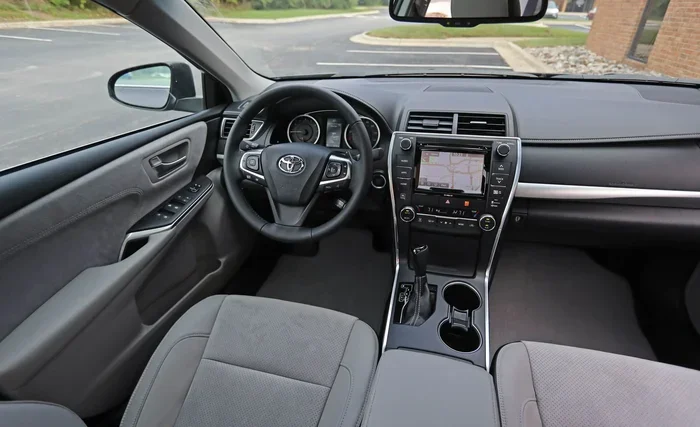
- Press the trip meter reset button. This is usually located on the dashboard near the speedometer or on the steering wheel controls.
- Scroll through the display menu. Use the trip button to navigate until you see the maintenance reminder or odometer settings.
- Hold the reset button for several seconds. Keep holding it until the display shows the maintenance light has been reset or the hours/miles counter goes to zero.
- Turn the ignition off and then back on. This confirms the reset was successful. The maintenance light should now be off.
This method works great for Toyota Corolla, Camry, and many other popular models. If you are unsure about your specific model, check your owner manual. It will have the exact button sequence for your year.
Method 2: Reset Using the Steering Wheel Controls (Newer Models)
Newer Toyota models from 2015 onward often use steering wheel controls for dashboard menus. Here is how to reset the maintenance light on these vehicles:
- Press the MENU button on the steering wheel. This brings up the vehicle information display.
- Navigate to the maintenance or service menu. Use the arrow buttons to scroll through the options.
- Select the maintenance reminder option. It may be labeled “Maintenance Reset” or “Service Reset.”
- Press and hold the OK or ENTER button. Hold it for about five seconds until the display confirms the reset.
- Exit the menu and turn the ignition off. The maintenance light should now be cleared from the dashboard.
If you have a newer Toyota with a touchscreen display, the process is similar. You will find the maintenance settings in the vehicle settings menu. Look for “Maintenance” or “Service” and follow the on-screen prompts.
Method 3: Using the OBD Scanner (For Persistent Lights)
Sometimes the maintenance light will not reset using the dashboard buttons. In these cases, an OBD scanner can help. An OBD scanner plugs into the diagnostic port under your steering column. It reads the codes stored in your Toyota’s computer system.
You can purchase a basic OBD scanner for under $30 at most auto parts stores. Simply plug it in, follow the on-screen instructions, and select the option to clear maintenance codes. This method is also helpful if you want to read ABS codes without a scanner or diagnose other dashboard warnings.
Keep in mind that using an OBD scanner is more advanced. If you are not comfortable with this method, you can always visit a Toyota dealer or trusted mechanic. They have professional tools and can reset the light quickly.
Common Problems After Resetting the Maintenance Light
Resetting the maintenance light is usually a breeze. But sometimes things do not go as planned. Here are some common issues and how to fix them.
The light stays on after resetting: This can happen if the service was not fully completed. For example, if the oil was not changed or the air filter was not replaced, the system may keep the light on. Double-check that all scheduled services were done. Then try the reset process again.
The light comes back immediately: If the maintenance light returns right after you reset it, the system may not have recognized the service. This often happens when the oil life monitor was not properly reset. Try the reset process one more time and make sure you hold the button long enough.
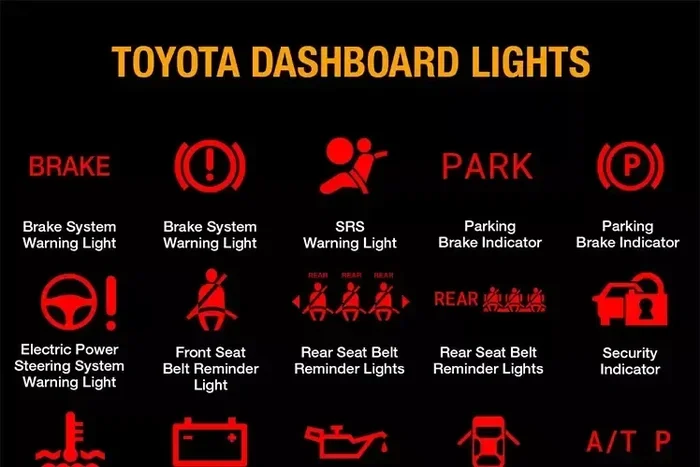
Multiple warning lights appear: If other lights come on along with the maintenance light, there may be a deeper issue. Check your dashboard warning lights guide to understand what each light means. A flashing check engine light paired with the maintenance light could signal a real problem that needs attention.
Reset button does not work: Some older Toyota models have a less responsive trip meter button. Try pressing it firmly or using a different button combination. If nothing works, the button itself may be worn out and need replacement.
Quick Tips to Avoid Reset Issues
- Always turn the ignition fully to ON before starting the reset process.
- Hold the reset button for at least five seconds.
- Make sure all required services are completed before resetting.
- Keep your owner manual handy for model-specific instructions.
- If you create a maintenance schedule, you will always know when the next service is due.
Tips to Keep Your Toyota Maintenance System Working Properly
Prevention is always better than cure. Here are some simple tips to keep your Toyota’s maintenance system running smoothly and avoid unexpected light activations.
Stick to the Recommended Service Intervals
Toyota provides a detailed maintenance schedule for every model. This schedule tells you exactly when to change the oil, replace filters, check fluids, and inspect brakes. Following this schedule keeps your car in top shape and prevents the maintenance light from coming on unexpectedly.
You can find the maintenance schedule in your owner manual or on the Toyota website. If you have trouble locating it, you can always visit a Toyota dealer. They can print out a service schedule specific to your vehicle. Staying on top of these intervals also helps you maintain your car value if you ever decide to sell.
Keep Track of Your Service Records
Every time you have your Toyota serviced, write down the date, mileage, and what was done. This log is incredibly helpful. It tells you exactly when your last service was completed. It also helps mechanics diagnose issues faster if something goes wrong later.
Many Toyota dealerships offer digital service records. You can access them online through your Toyota account. This makes it easy to see your complete service history at a glance. Some apps even send you reminders before your next service is due.
Use the Right Fluids and Parts
Toyota recommends specific fluids and parts for each model. Using the wrong oil or filter can trigger the maintenance light prematurely. Always check your owner manual for the correct specifications. When in doubt, ask your dealer or a trusted mechanic.
For example, if you drive a Toyota Corolla, make sure you use the recommended oil weight. The wrong viscosity can affect how the oil life monitor tracks your service needs. Using quality parts also extends the life of your engine and other components.
When Should You See a Professional?
Most of the time, resetting the maintenance light is a simple DIY task. But there are situations where professional help is the right call.
If the maintenance light keeps coming back no matter how many times you reset it, there may be an underlying issue. A certified Toyota technician can run a full diagnostic check and identify any problems. They have access to specialized tools that can read deeper codes in your vehicle’s computer system.
You should also see a professional if the maintenance light is accompanied by other warning signs. These include strange noises, reduced performance, or other dashboard lights staying on. In these cases, the maintenance light might be a symptom of a larger problem that needs expert attention.
Additionally, if you are not comfortable working with your vehicle’s dashboard controls, there is no shame in asking for help. A Toyota dealer can reset the light for you, often for free or a small fee. They can also walk you through the process so you feel confident doing it yourself next time.
Finding the Right Toyota Service Center
When looking for a service center, choose one that is certified by Toyota. These technicians receive specialized training for Toyota vehicles. They also have access to genuine Toyota parts and the latest diagnostic equipment. You can find a certified Toyota dealer near you on the official Toyota website.
Before visiting, call ahead and ask if they offer maintenance light reset services. Many dealers include this as part of a routine oil change or service appointment. This saves you time and ensures the job is done correctly.
Conclusion
Resetting a Toyota maintenance light is one of the easiest things you can do as a car owner. With just a few button presses, you can clear that annoying reminder and get back on the road. Whether you use the trip meter method, steering wheel controls, or an OBD scanner, the process is quick and straightforward.
Remember that resetting the light is not a replacement for actual maintenance. It is simply a way to clear the reminder after you have completed your scheduled service. Keep up with your Toyota maintenance schedule, use the right parts and fluids, and track your service records. These habits will keep your Toyota running strong for years to come.
If you ever run into trouble or the light refuses to go away, do not hesitate to seek professional help. A certified Toyota technician can diagnose and fix any issues quickly. Your Toyota is a reliable machine, and with proper care, it will serve you well for many miles ahead.
Frequently Asked Questions
How do I reset the maintenance light on a Toyota Camry?
To reset the maintenance light on a Toyota Camry, turn the ignition to ON without starting the engine. Press and hold the trip meter reset button on the dashboard until the maintenance indicator blinks. Release the button and turn the ignition off. The light should now be cleared. If this does not work, try using the steering wheel controls to navigate to the maintenance reset option on the display screen.
How often should I reset my Toyota maintenance light?
You should reset the maintenance light every time you complete a scheduled service. This includes oil changes, tire rotations, and other routine maintenance tasks. Resetting it after each service keeps your maintenance tracking accurate. If you do not reset it, the light will stay on even after you have had the work done.
Can I drive my Toyota with the maintenance light on?
Yes, you can drive your Toyota with the maintenance light on. The light is a reminder and does not indicate a dangerous problem. However, it is best not to ignore it for too long. Delaying scheduled service can lead to wear and tear on your engine and other components. Plan your service visit soon after the light comes on.
What is the difference between the maintenance light and the check engine light?
The maintenance light is a service reminder that tells you it is time for scheduled maintenance like an oil change. The check engine light indicates a potential problem with your vehicle’s engine or emissions system. The check engine light requires immediate attention, while the maintenance light is simply a reminder for routine care.
Will resetting the maintenance light clear any error codes?
No, resetting the maintenance light only clears the service reminder. It does not clear error codes stored in your Toyota’s computer system. If you have other warning lights on, those codes need to be addressed separately. You can use an OBD scanner to read and clear diagnostic codes if needed.
What should I do if the maintenance light will not reset?
If the maintenance light will not reset, first make sure all scheduled services have been completed. Then try the reset process again, holding the button for at least five seconds. If it still will not reset, visit a Toyota dealer or certified mechanic. They have professional diagnostic tools that can identify and resolve the issue quickly.
=== INTERNAL LINKS ===
For more helpful Toyota maintenance tips, check out our guide on how to create a maintenance schedule to keep your vehicle running smoothly. You can also learn how to reset my oil life if you are dealing with an oil change indicator. And if you want to make sure your oil is at the right level before your next service, read our article on how to check the oil level in my oil tank for a simple step-by-step process.