How Do I Reset My Toyota Camry And Everything You Need
Resetting your Toyota Camry is simpler than most owners think. Whether you need to clear a maintenance light, reset the oil life indicator, or reboot the infotainment system, this guide walks you through every method. You will learn the exact steps for Toyota Camry reset procedures across different model years and trim levels.
Key Takeaways
- Multiple Reset Types: Your Toyota Camry has several systems that can be reset, including the oil life, maintenance light, trip meter, and infotainment display.
- No Special Tools Needed: Most resets can be done with just the steering wheel buttons or the key fob.
- Model Year Matters: The reset process varies slightly between older and newer Camry models, so knowing your year is important.
- Regular Resets Keep You on Track: Resetting maintenance indicators after service helps you monitor your next service interval accurately.
- Battery Reset Is a Last Resort: Disconnecting the battery can reset many systems but should only be done when other methods fail.
- When to See a Pro: Some warning lights require a professional diagnostic tool and should not be ignored.
📑 Table of Contents
- How Do I Reset My Toyota Camry And Everything You Need To Know
- Resetting the Oil Life Indicator on Your Toyota Camry
- Resetting the Maintenance Reminder Light
- Resetting the Dashboard Warning Lights
- Resetting the Infotainment and Display Screen
- Resetting the Trip Meter and Odometer
- Resetting the Toyota Camry with a Battery Disconnect
- What to Do If Your Toyota Camry Won’t Start After a Reset
- Expert Tips for Keeping Your Toyota Camry in Top Shape
- Common Mistakes People Make When Resetting Their Toyota Camry
- Quick Reference: Toyota Camry Reset Summary by System
- Final Thoughts on Resetting Your Toyota Camry
How Do I Reset My Toyota Camry And Everything You Need To Know
If you own a Toyota Camry, you have probably noticed a warning light or a maintenance reminder pop up on your dashboard at some point. These alerts are designed to keep your car running smoothly, but they can also be confusing. The good news is that resetting your Toyota Camry is something you can do at home in just a few minutes.
Whether you just finished an oil change, cleared a fault code, or simply want to reboot your infotainment system, this guide covers every reset method you need. We will walk through each step in plain language so anyone can follow along. By the end, you will feel confident handling your Camry’s reset needs without visiting a dealership.
Let us start with the most common reason people search for this topic. The oil life reset is something almost every Camry owner needs to do after an oil change. It keeps your maintenance schedule accurate and your car running at its best.
Resetting the Oil Life Indicator on Your Toyota Camry
The oil life system in your Toyota Camry tracks driving conditions and tells you when it is time for an oil change. After you get fresh oil, you need to reset this indicator. If you skip this step, the reminder will keep flashing and can be annoying every time you start the car.
Steps to Reset the Oil Life on a Toyota Camry (2012 and Newer)
Follow these simple steps to reset the oil life indicator on modern Camry models:
- Turn the ignition to the “On” position without starting the engine. You can do this by pressing the start button without pressing the brake pedal.
- Press the steering wheel controls to navigate to the “Maintenance” or “Odometer” menu on the instrument cluster.
- Find the “Oil Life” option and hold the “Reset” button for about five seconds.
- The display should flash and then reset to 100%. You have successfully completed the Toyota Camry oil reset.
Resetting Oil Life on Older Camry Models (2007-2011)
Older Camry models use a slightly different process. Here is what you need to do:
- Turn the key to the “On” position (do not start the engine).
- Press the trip odometer button until you see the oil life percentage.
- Hold the trip reset button for several seconds until the display blinks.
- Release the button and turn the key off. The reset is complete.
For more details on oil level checks and resets, you can also read our guide on how to check the oil level in your oil tank. It pairs well with the reset process and helps you stay on top of your Camry’s maintenance.
Resetting the Maintenance Reminder Light
The maintenance reminder light is different from the oil life indicator. It is a general service alert that tells you it is time for routine inspections. This light commonly appears after 5,000 or 10,000 miles depending on your driving conditions.
How to Reset the Maintenance Light
Here is the standard procedure for most Toyota Camry models:
- Make sure the car is off but the ignition is in the “On” position.
- Locate the trip meter reset button on the dashboard or steering wheel controls.
- Press and hold the button while turning the ignition to the “On” position.
- Hold the button until the maintenance light turns off. This usually takes about 10 seconds.
- Turn the ignition off and then back on to confirm the reset worked.
Some Camry owners also need to reset the Toyota Camry maintenance schedule in the multi-information display. For models with a touchscreen, go to Settings, then Maintenance, and select “Reset Service Indicators.” This method works for 2015 and newer models.
Resetting the Dashboard Warning Lights
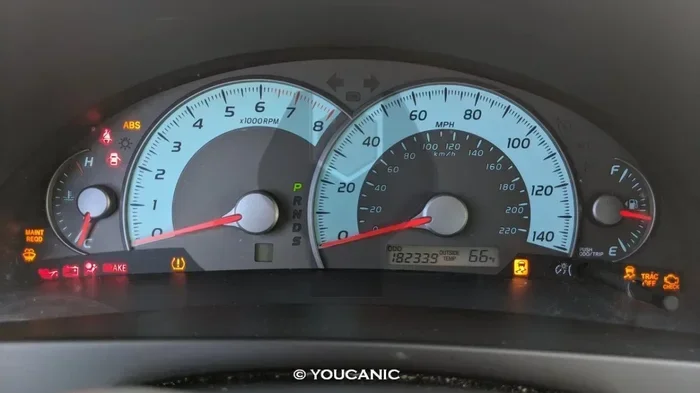
Dashboard warning lights can be scary, especially when they pop up unexpectedly. Some lights simply need a reset after the underlying issue is fixed. Others may indicate a problem that needs professional attention.
Common Warning Lights That Can Be Reset
- Check Engine Light: After repairing the issue, the light often resets itself after a few drive cycles. You can also use an OBD-II scanner to clear the code.
- Tire Pressure Warning Light: Inflate your tires to the recommended PSI, then drive at 50 mph for a few minutes. The light should turn off automatically.
- ABS Warning Light: If the ABS system has been serviced, a diagnostic scanner may be needed to clear the code.
- Battery Warning Light: This light usually indicates an actual electrical problem. Resetting it without fixing the issue is not recommended.
For warning lights related to the hybrid system, check out our article on driving your Prius when it says check hybrid system, which covers similar diagnostic steps that apply to Camry hybrids as well.
When NOT to Reset Warning Lights
Not every warning light should be reset. If your Camry is showing a red oil pressure light or a flashing check engine light, do not just reset it. These indicate serious problems that need immediate attention. Resetting them without fixing the root cause can lead to expensive damage.
Resetting the Infotainment and Display Screen
The Toyota Camry comes with a modern infotainment system that sometimes freezes or becomes unresponsive. A soft reset can fix most software glitches without affecting your saved settings or paired devices.
How to Soft Reset the Infotainment System
A soft reset simply restarts the display without erasing any data. Here is how to do it:
- Press and hold the power button on the infotainment screen for 10 to 15 seconds.
- The screen will go dark and then restart automatically.
- Once it boots back up, your Bluetooth connections and radio presets should still be intact.
Factory Reset of the Infotainment System
If a soft reset does not work, you may need a factory reset. This restores the system to its original settings. You will need to re-pair your phone and redo your preferences afterward.
- Go to Settings on the infotainment screen.
- Select “System” and then “Reset to Factory Settings.”
- Confirm the reset and wait for the system to restart.
Some Camry owners also ask about Toyota Camry factory reset procedures for the entire vehicle. A full vehicle reset requires disconnecting the battery, which we will cover in a later section.
Resetting the Trip Meter and Odometer
The trip meter is a useful tool for tracking short distances, fuel economy, or trips. When you want to start fresh, resetting it is very simple.
How to Reset the Trip Meter
- Press the trip button on the dashboard or steering wheel until the trip display appears.
- Press and hold the same button for about three seconds.
- The trip reading will return to zero.
- You can now start tracking your next trip or driving segment.
You can switch between Trip A and Trip B by pressing the trip button briefly. This lets you track two different trips at the same time, which is great for monitoring fuel efficiency on different routes.
Resetting the Toyota Camry with a Battery Disconnect
Sometimes, none of the above methods work, or you have a persistent electrical issue that needs a full system reset. Disconnecting the battery is the most thorough reset method available.
How to Disconnect the Battery to Reset Your Camry
Follow these steps carefully to avoid any issues:
- Park your Camry on a flat surface and turn off the engine.
- Open the hood and locate the battery. The negative terminal is marked with a minus sign.
- Using a wrench, loosen the nut on the negative terminal clamp.
- Remove the cable from the terminal and place it away from the battery post.
- Wait at least 15 minutes. This allows the vehicle’s computer systems to fully power down.
- Reconnect the negative terminal and tighten the nut securely.
- Start the engine and check that all systems are functioning normally.
Keep in mind that disconnecting the battery will also reset your radio presets, clock, and some personalized settings. You will need to reprogram these after reconnecting. Also, some Camry models may need the steering wheel alignment relearned after a battery disconnect.
For more information on battery-related issues, check out our guide on how to reset your oil life, which covers related maintenance reset procedures.
What to Do If Your Toyota Camry Won’t Start After a Reset
Occasionally, after performing a reset or battery disconnect, your Camry may not start right away. This is normal and usually not a cause for concern. The vehicle’s computer needs time to relearn driving patterns and recalibrate sensors.
Try these steps if your Camry does not start after a reset:
- Wait 30 seconds and try starting again.
- Make sure the key fob is close to the start button if your Camry uses push-button start.
- Check that the battery terminals are tight and free of corrosion.
- Cycle the ignition key from “Off” to “On” three times, then try starting.
If the problem persists, you may want to consult a Toyota dealer. Our article on whether you can take your Toyota to any dealer for service explains your service options if you are not near your regular dealer.
Expert Tips for Keeping Your Toyota Camry in Top Shape
Resetting your Camry is just one part of regular maintenance. Here are some expert tips that help Camry owners keep their vehicles running strong for years:
- Follow the Maintenance Schedule: Stick to Toyota’s recommended service intervals. Regular oil changes and inspections prevent most warning lights from appearing.
- Use Genuine Toyota Parts: Aftermarket parts can sometimes trigger warning lights or reset issues that genuine OEM parts avoid.
- Keep Your Owner’s Manual Handy: Every Camry model year has slight differences in reset procedures. The manual has the most accurate instructions for your specific vehicle.
- Monitor Your Fluid Levels: Regularly check your oil, coolant, and brake fluid levels. Low fluids can trigger warning lights that need more than just a reset.
- Stay Updated: Toyota occasionally releases software updates for the infotainment system. Check with your dealer to see if your Camry is eligible.
The Toyota Camry is known for reliability and longevity. Many Camrys easily surpass 200,000 miles with proper care. For more on this, read our piece on whether a Toyota Camry can go to 500,000 miles for inspiring examples of long-lasting Camrys.
Common Mistakes People Make When Resetting Their Toyota Camry
Even simple reset procedures can go wrong if you are not careful. Here are the most common mistakes Camry owners make:
- Not Holding the Button Long Enough: Many resets require you to hold a button for 5 to 10 seconds. Releasing too early is the number one reason resets fail.
- Trying to Reset While Driving: Always perform resets with the vehicle parked and the ignition in the “On” or “Accessory” position.
- Ignoring the Root Cause: Resetting a warning light without fixing the underlying problem is like putting tape over a check engine light. The issue will come back.
- Disconnecting the Wrong Terminal: Always disconnect the negative battery terminal first. Removing the positive terminal can cause short circuits and damage electrical components.
- Skipping the Relearn Process: After a battery disconnect, some systems like the idle air control and transmission adaptive learning need a relearn drive cycle. Take your Camry for a 20-minute highway drive after reconnecting the battery.
Quick Reference: Toyota Camry Reset Summary by System
Here is a quick reference table that summarizes the reset methods for different Camry systems:
- Oil Life Reset: Steering wheel controls, hold reset for 5 seconds.
- Maintenance Light Reset: Trip button + ignition on, hold for 10 seconds.
- Trip Meter Reset: Trip button, hold for 3 seconds.
- Infotainment Soft Reset: Hold power button for 10-15 seconds.
- Infotainment Factory Reset: Settings, then System, then Reset to Factory Settings.
- Full Vehicle Reset: Disconnect negative battery terminal for 15 minutes.
- Check Engine Light: Fix the issue, then use an OBD-II scanner or drive cycles.
- Tire Pressure Light: Inflate tires, drive at 50 mph for a few minutes.
Final Thoughts on Resetting Your Toyota Camry
Knowing how to reset your Toyota Camry is an essential skill for every owner. It saves you time and money, and it keeps your car’s systems running accurately. From the oil life reset to the infotainment reboot, each procedure is straightforward once you know the steps.
Remember that resets are meant to complement regular maintenance, not replace it. If a warning light keeps coming back after you reset it, there is an underlying issue that needs professional attention. Trust your instincts and do not ignore persistent alerts.
Your Toyota Camry is a well-engineered machine that rewards consistent care. With the knowledge in this guide, you can handle most reset situations confidently at home. Keep this article bookmarked for future reference, and share it with fellow Camry owners who might find it helpful.
Stay proactive about your Camry’s maintenance schedule, and your vehicle will reward you with years of reliable service. Whether you are resetting the oil life after a DIY oil change or clearing a maintenance reminder, you now have everything you need to get the job done right.
Frequently Asked Questions
How do I reset my Toyota Camry after an oil change?
Turn the ignition to the “On” position without starting the engine. Navigate to the Maintenance or Oil Life menu using the steering wheel controls. Press and hold the Reset button for about five seconds until the display shows 100%. This completes the Toyota Camry reset for the oil life system.
Can I reset the check engine light on my Toyota Camry myself?
You can reset the check engine light after fixing the underlying issue, but you will need an OBD-II scanner or a few drive cycles for the light to turn off on its own. Simply resetting the light without fixing the problem will cause it to return. Always diagnose the root cause first.
Why won’t my Toyota Camry reset after I followed the steps?
If the reset does not work, make sure you held the button long enough, as most resets require 5 to 10 seconds of continuous pressure. Also verify that you are in the correct menu and that the ignition is in the “On” position. If the issue persists, try a battery disconnect or consult a Toyota dealer.
Will resetting my Toyota Camry erase any saved data?
A soft reset or system-specific reset will not erase your saved data. However, a full battery disconnect will reset the radio presets, clock, and some personalized settings. The infotactory reset will also clear paired devices and preferences, so you will need to reconfigure them.
How often should I reset the maintenance light on my Toyota Camry?
You should reset the maintenance light every time you complete a scheduled service, such as an oil change or tire rotation. This keeps the maintenance reminder accurate and helps you stay on track with Toyota’s recommended maintenance schedule.
Is it safe to disconnect the battery to reset my Toyota Camry?
Yes, it is safe if you follow the proper steps. Always disconnect the negative terminal first, wait at least 15 minutes, and then reconnect it securely. Be aware that a battery disconnect will reset some vehicle settings and may require a relearn drive cycle for certain systems to recalibrate properly.