How Do You Reset a 2018 Toyota Sienna the Easy Way
Resetting a 2018 Toyota Sienna is simpler than most owners think. Whether you need to clear the maintenance required light, reset the oil life system, or address dashboard warnings, this guide walks you through every method. You will learn the exact steps, avoid common mistakes, and keep your Sienna running smoothly.
Owning a 2018 Toyota Sienna comes with a lot of perks. This minivan is reliable, spacious, and built to last. But every once in a while, a light pops up on your dashboard and leaves you scratching your head. Maybe it is the maintenance required light. Maybe it is the oil life indicator. Either way, you want it gone, and you want it gone now.
Here is the good news. Resetting a 2018 Toyota Sienna does not require a trip to the dealer or a costly service call. In most cases, you can handle it yourself in just a few minutes. This guide gives you clear, step-by-step instructions for every common reset on your 2018 Sienna. We also share tips to avoid mistakes and know when to call a professional.
Whether you just changed your oil or cleared a warning light after a repair, you are in the right place. Let us walk through the process together.
Key Takeaways
- Multiple reset methods exist: The 2018 Toyota Sienna uses steering wheel controls and the instrument cluster to reset different indicators.
- Oil life reset is routine: Changing your oil and resetting the oil life system keeps your maintenance schedule on track.
- Maintenance light and oil life are different: Understanding this distinction helps you apply the correct reset procedure each time.
- Most resets take under five minutes: You do not need a mechanic or expensive tools for the common resets.
- Some issues need professional help: Persistent warning lights may signal deeper problems that require a Toyota dealership visit.
- Regular resets support longevity: Keeping up with reset intervals helps you stay on top of your Toyota Sienna maintenance schedule.
📑 Table of Contents
- What Does It Mean to Reset a 2018 Toyota Sienna?
- How to Reset the Maintenance Required Light
- How to Reset the Oil Life System
- How to Reset the Trip Meter
- How to Reset Other Dashboard Indicators
- Common Mistakes When Resetting a 2018 Toyota Sienna
- When Should You See a Professional?
- Quick Tips for Keeping Your 2018 Toyota Sienna in Top Shape
- Final Thoughts
What Does It Mean to Reset a 2018 Toyota Sienna?
Before we dive into the steps, let us clear up what “reset” actually means on your Sienna. When we talk about resetting, we are referring to clearing or restarting specific indicators and systems. These include the maintenance required light, the oil life monitor, trip meters, and occasionally other dashboard warnings.
Each of these systems works independently. That means resetting one does not automatically reset another. For example, clearing the maintenance required light does not also reset your oil life percentage. You need to handle each one separately. This is why understanding the difference matters so much.
The 2018 Toyota Sienna uses a combination of steering wheel controls and the instrument cluster to manage resets. The process is straightforward once you know which button does what. Below, we break down every reset method in detail.
How to Reset the Maintenance Required Light
The maintenance required light is the most common reason owners look up how to reset a 2018 Toyota Sienna. This light typically comes on every 5,000 miles or based on your driving conditions. It is Toyota’s way of reminding you that service is due.
Here is the step-by-step process to turn it off:
- Turn the ignition to the ON position. Do not start the engine. Just press the power button once so the dashboard lights up.
- Press the odometer/trip button. This button is usually located on the instrument cluster or steering wheel. Press it until the display shows the total mileage.
- Turn the ignition to OFF. Then back to ON.
- Hold the odometer/trip button. Keep holding it for about 10 to 15 seconds. The maintenance light should start to blink.
- Release the button. The light should now be off.
If the light does not go off, try the process again. Sometimes it takes two attempts. Make sure you are holding the button long enough. Patience is key here.
Why the Maintenance Light Keeps Coming Back
If you reset the light but it returns within a few days, there is a reason. The vehicle’s system has detected that service is still needed. This could mean you skipped an oil change or the system did not fully register the service. To prevent this from happening again, make sure your service is recorded properly. You can also create a maintenance schedule to stay ahead of these reminders. Learning how to create a maintenance schedule helps you track oil changes, tire rotations, and other services without relying solely on dashboard lights.
How to Reset the Oil Life System
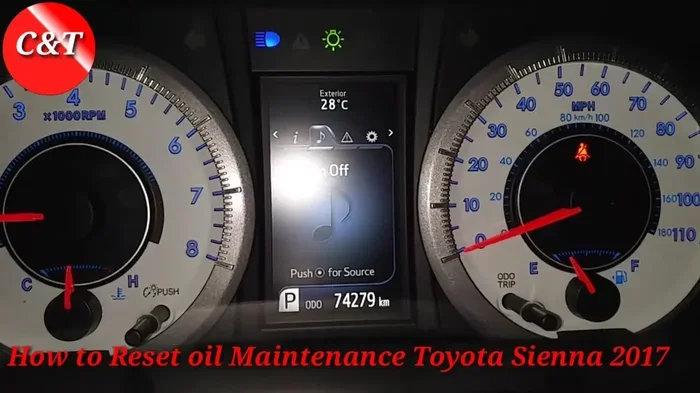
The oil life system is different from the maintenance required light. It tracks the condition of your engine oil based on driving habits, temperature, and engine load. When the oil life drops to zero, your Sienna is telling you the oil needs to be replaced.
After you change the oil, you need to reset the oil life monitor. Here is how:
- Turn the ignition to ON. Make sure the engine is off but the dashboard is lit.
- Use the steering wheel controls. Press the arrow buttons to navigate to the oil life display on the instrument cluster.
- Press and hold the RESET button. This button is usually located on the right side of the steering wheel. Hold it for a few seconds.
- Release the button when the display resets. The oil life percentage should return to 100%.
That is it. The system now recognizes that you have fresh oil and the countdown starts over again.
How Often Should You Reset the Oil Life?
Every time you get an oil change, reset the system. Even if you use synthetic oil and extend your intervals, the reset tells the computer that fresh lubricant is in the engine. This keeps your readings accurate and helps you plan future services. If you are unsure about your oil level, you should also check the oil level in your oil tank regularly. Checking your oil level is a quick habit that prevents engine damage and keeps your Sienna running strong.
How to Reset the Trip Meter
The trip meter on your 2018 Toyota Sienna tracks short-distance driving. You might use it to measure a commute, a road trip, or fuel efficiency calculations. When you want to start fresh, resetting it is easy.
Here is what to do:
- Press the TRIP button on the steering wheel. Cycle through the display options until you see the trip meter you want to reset.
- Press and hold the TRIP button for about two seconds. The reading should return to zero.
You can reset the trip meter at any time. Some owners do it at every fill-up to track fuel economy. Others reset it after a long road trip to measure the next journey.
Trip A vs. Trip B: What Is the Difference?
The 2018 Sienna offers two trip meters. Trip A is typically used for tracking mileage between fill-ups. Trip B is useful for monitoring specific trips or routes. You can switch between them using the steering wheel controls. Both reset the same way, and neither affects the main odometer reading.
How to Reset Other Dashboard Indicators
Beyond the maintenance light and oil life system, your 2018 Toyota Sienna has several other indicators that may need resetting. These include the tire pressure warning, the check engine light, and various service reminders.
Tire Pressure Monitoring System Reset
If you have checked your tire pressure and the TPMS light is still on, try this:
- Drive the vehicle at speeds above 30 mph for a few minutes.
- The system may auto-calibrate after a short drive.
- If the light persists, locate the TPMS reset button under the steering column and hold it for three seconds.
Check Engine Light Reset
The check engine light is different from other indicators. It usually signals an underlying issue. Before you try to reset it, read the codes first. You can read ABS codes without a scanner using basic tools, and the same approach applies to OBD-II codes. If the code has been fixed, the light may turn off on its own after a few driving cycles. Forcing a reset without fixing the root cause is not recommended.
Common Mistakes When Resetting a 2018 Toyota Sienna
Even simple tasks can go wrong if you rush through them. Here are the most common mistakes owners make when resetting their Sienna, and how to avoid them.
- Not holding the button long enough. Many resets require 10 to 15 seconds of continuous pressure. Letting go too early means the reset does not register.
- Confusing the maintenance light with the oil life indicator. These are two separate systems. Resetting one does not reset the other. Make sure you are targeting the correct light.
- Resetting without completing the service first. If the maintenance light is on because you need an oil change, do not just reset it. Get the oil changed first. Resetting it prematurely just hides the problem.
- Ignoring persistent warning lights. If a light comes back immediately after a reset, something is wrong. Do not keep resetting it. Investigate the cause.
- Not consulting the owner’s manual. The 2018 Toyota Sienna owner manual contains specific reset instructions for your exact trim level. It is a valuable resource that many owners overlook.
When Should You See a Professional?
Most resets on the 2018 Toyota Sienna are DIY-friendly. But there are times when professional help is the right call. You should visit a Toyota dealership or a trusted mechanic if:
- The maintenance light or oil life indicator will not reset after multiple attempts.
- The check engine light is flashing, not just solid. A flashing light often indicates a serious engine issue.
- You notice multiple dashboard lights coming on at the same time.
- Your Sienna is running rough, making unusual noises, or showing signs of poor performance.
- You are unsure what a particular warning light means.
Sometimes a simple code reader or a visit to the dealership can reveal what you cannot see from the driver’s seat. Toyota dealerships have specialized tools that can read deeper system codes and perform advanced resets. If your vehicle is still under warranty, a dealership visit may be the best route anyway.
Quick Tips for Keeping Your 2018 Toyota Sienna in Top Shape
Resetting indicators is just one part of vehicle ownership. Here are a few quick tips to keep your Sienna running at its best:
- Reset the oil life system after every oil change. This keeps your maintenance tracking accurate.
- Check tire pressure monthly. Proper pressure improves fuel economy and safety.
- Stay on top of fluid levels. Brake fluid, coolant, and transmission fluid all need regular checks.
- Keep a service log. Write down every oil change, tire rotation, and major service. This helps you stay organized and supports resale value.
- Use genuine Toyota parts when possible. They are designed specifically for your Sienna and meet Toyota’s quality standards.
Taking these small steps goes a long way. Your 2018 Toyota Sienna will reward you with years of dependable service.
Final Thoughts
Now you know how to reset a 2018 Toyota Sienna like a pro. From the maintenance required light to the oil life system and trip meters, each reset is simple and takes just a few minutes. The key is to follow the steps carefully, not rush the process, and understand which system you are actually resetting.
Remember, resets are meant to follow real service, not replace it. Always complete the maintenance first, then clear the indicator. And if a warning light keeps coming back, do not ignore it. Your Sienna is telling you something, and listening is the best thing you can do for your vehicle.
Keep this guide bookmarked. The next time a light comes on, you will know exactly what to do. That is the kind of confidence every car owner deserves.
Frequently Asked Questions
How long does it take to reset a 2018 Toyota Sienna?
Most resets take less than five minutes. The maintenance light reset and oil life reset are the quickest. Trip meter resets take just a few seconds. The only variable is if you need to locate the right button or cycle through display menus first.
Can I reset the maintenance light without changing the oil?
Technically yes, but you should not. The maintenance light comes on for a reason. Resetting it without completing the required service means you are masking a real need. Always perform the service first, then reset the light to clear the reminder.
Why does the oil life indicator reset to 100% after an oil change?
The oil life system monitors driving conditions and engine performance. When you add fresh oil and reset the system, it starts a new tracking cycle from full. This tells you the system is ready to monitor the new oil until the next change is due.
Will resetting the maintenance light affect my warranty?
No. Resetting the maintenance light does not void your warranty. The light is simply a reminder. However, keep records of all service appointments and receipts. Toyota dealerships and authorized service centers recommend staying current with maintenance to keep your warranty valid.
What should I do if the reset button does not work?
Try the process again and make sure you are holding the button for the full duration. If it still does not work, the button or the instrument cluster may have an issue. In that case, a visit to a Toyota dealership or qualified mechanic is the best next step.
Is it safe to drive with the maintenance light on?
Yes, in most cases it is safe to drive short distances. The maintenance light is a reminder, not an emergency warning. However, you should schedule service soon. Ignoring it for too long can lead to missed maintenance that may affect your vehicle’s performance over time.