How to Remote Start a Honda Civic in 5 Simple Steps
Remote starting your Honda Civic is easier than you think. Whether you have a factory-installed system or an aftermarket remote starter, this guide walks you through the process in five clear steps. You will learn how to use your key fob, set up the system, and avoid common mistakes that cause problems.
There is nothing quite like stepping into a warm Honda Civic on a cold winter morning. Or walking to a cooled-down car after a long day in summer heat. Remote start Honda Civic systems make this possible with the push of a button on your key fob.
If you are new to this feature or just bought a used Civic and are not sure how it works, you are in the right place. This guide shows you how to remote start a Honda Civic in five simple steps. We cover factory systems, aftermarket options, setup tips, and common fixes. Whether you drive a sedan or a hatchback, this guide has you covered.
Before we dive in, let us quickly talk about what a remote start system does. It starts your car engine from a distance using your key fob or a smartphone app. The engine runs, the climate control kicks in, and your car is ready when you are. It is one of the most popular car comfort features available today.
If you are brand new to driving or just new to the Honda brand, check out our guide on how to drive a car for beginners for a broader overview of getting comfortable with your vehicle. Now, let us get into the steps.
Key Takeaways
- Factory remote start: Many Honda Civic models come with a built-in remote start system that works with your key fob.
- Aftermarket options: You can install a universal or brand-specific remote starter if your Civic does not have one.
- Five simple steps: The process involves preparation, fob setup, system activation, testing, and troubleshooting.
- Climate control benefit: Remote start lets you warm up or cool down your car before you get in, which is great for extreme weather.
- Safety first: Always follow Honda guidelines and local laws about idle warm-up and emissions.
📑 Table of Contents
- Step 1: Check if Your Honda Civic Has Remote Start
- Step 2: Choose the Right Remote Start System
- Step 3: Set Up and Activate Your Remote Start
- Step 4: Use Your Remote Start Safely and Effectively
- Step 5: Troubleshoot Common Remote Start Issues
- Expert Tips for Getting the Most Out of Your Honda Civic Remote Start
- Conclusion
Step 1: Check if Your Honda Civic Has Remote Start
The first step is simple. You need to know whether your Civic already has a remote start system. Not every Honda Civic model comes with this feature from the factory. It often depends on the trim level and the model year.
Factory Remote Start by Trim Level
Higher trims like the Honda Civic Sport, EX, and Touring are more likely to include a factory remote start. Base models and older Civics may not have it at all. Here is a quick way to check:
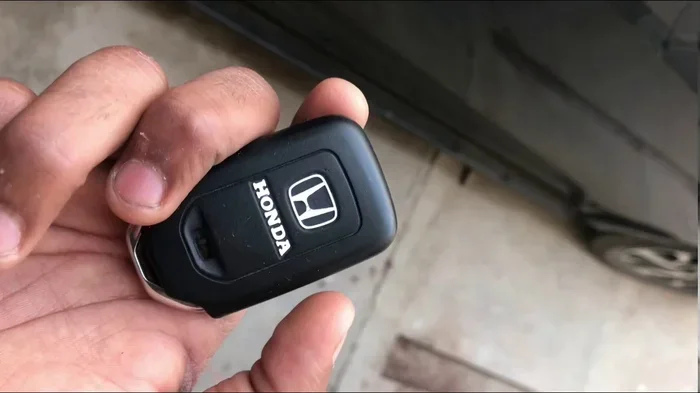
- Look for a remote start button on your key fob. It usually has a circular arrow icon.
- Check your owner’s manual for the remote start section.
- Look under the dashboard for a remote start module or wiring harness.
- Search for “remote start” in the Honda Civic infotainment settings if your car has a screen.
If your Civic does not have a factory remote start, do not worry. You can still add one using an aftermarket system. We will cover that in Step 2.
Check Your Model Year Compatibility
Honda Civic models from 2006 onward are generally more compatible with remote start systems. Newer models from 2016 to 2024 often include Honda Civic technology packages that bundle remote start with keyless entry and push-button ignition. If you own an older model, you may need a more basic aftermarket system.
Step 2: Choose the Right Remote Start System
If your Honda Civic does not have a factory remote start, you have two main paths. You can install an aftermarket remote starter yourself or have a professional do it. Let us look at both options.
Factory-Style Aftermarket Systems
These systems mimic the factory experience. They come with a remote that looks and feels like your original key fob. Popular brands include Compustar, Viper, and DroneMobile. These systems often include features like:
- Long-range remotes that work from 3,000 to 5,000 feet away.
- Smartphone integration so you can start your car from an app.
- Two-way feedback that confirms your car started successfully.
- Anti-theft protection that works alongside your Honda security system.
Professional Installation vs. DIY
Installing a remote starter involves wiring into your car’s electrical system. If you have experience with car electronics, a DIY install can save you money. However, for most people, professional installation is the safer choice. A professional will make sure the remote start installation does not void your warranty or cause electrical issues. If you are planning other modifications, you might also want to check out our guide on how to modify a car to make it faster for more ideas.
Step 3: Set Up and Activate Your Remote Start
Now comes the fun part. Setting up and activating your Honda Civic remote start system. The exact steps vary depending on whether you have a factory or aftermarket system, but the general process is similar.
For Factory Remote Start Systems
Follow these steps if your Civic came with remote start from the factory:
- Make sure your car is parked and the doors are closed.
- Press the brake pedal and keep it pressed.
- Press the engine start/stop button without pressing the brake. This puts the car in accessory mode.
- Press the remote start button on your key fob within five seconds.
- You should see the parking lights flash and hear the engine start.
For Aftermarket Remote Start Systems
If you installed an aftermarket system, the setup process is different:
- Turn the ignition to the “on” position (do not start the engine).
- Press and hold the valet button or programming button on the remote starter module.
- Follow the specific instructions in your aftermarket system’s manual.
- Program your remote fob by following the pairing steps.
- Test the system by standing a few feet away and pressing the remote start button.
Always refer to your Honda Civic owner’s manual or the remote starter manual for model-specific instructions. Every system is a little different, and the manual will have the exact programming sequence for your setup.
Step 4: Use Your Remote Start Safely and Effectively
Once your system is set up, you want to use it the right way. Remote start Honda Civic systems are convenient, but they also come with a few important safety and usage considerations.
Best Practices for Daily Use
- Stay within range. Most factory remotes work from about 200 to 500 feet. Aftermarket long-range remotes can reach much farther.
- Do not leave the car unattended for too long. Most systems auto-shut off after 10 to 15 minutes to protect your engine.
- Check for obstacles. Make sure no one is near the car or in the exhaust path before starting remotely.
- Use climate control wisely. In winter, remote start warms up the engine and defrosts the windshield. In summer, it cools the interior. This is a huge benefit for cold weather driving and auto climate control.
Legal and Environmental Considerations
Some areas have laws about how long a vehicle can idle. Idling for too long can waste fuel and increase emissions. Always check your local regulations. In many places, remote start is perfectly legal for warming up your car before driving. Just do not leave it running for extended periods while you are still far away.
Tips for Extreme Weather
Remote start really shines in extreme weather. Here are a few tips:
- In freezing temperatures, start your Civic 5 to 10 minutes before you leave.
- In hot climates, start the car 3 to 5 minutes before you get in to let the AC cool the interior.
- Use the Honda Civic key fob with a dead battery? Most systems let you use the physical key as a backup.
Keeping your car comfortable in all seasons is one of the best reasons to have a remote start. It also helps reduce wear on your engine during cold starts, since the oil circulates before you drive off.
Step 5: Troubleshoot Common Remote Start Issues
Even the best systems can have occasional hiccups. Here are the most common issues Honda Civic owners face with remote start and how to fix them.
The Remote Start Button Does Not Work
If pressing the button does nothing, try these fixes:
- Replace the key fob battery. A weak battery is the most common cause.
- Make sure the car is in Park (automatic) or Neutral (manual).
- Check that all doors are fully closed.
- Verify that the brake pedal is pressed (for push-button start models).
The Engine Starts but Shuts Off Immediately
This is a safety feature. The system may shut off if it detects a problem. Common causes include:
- Low oil pressure.
- Engine coolant temperature too high.
- Key fob out of range.
- Aftermarket system wiring issue.
If the problem persists, it is worth visiting a mechanic or the Honda dealership. They can run diagnostics to find the root cause. If you are dealing with any warning lights or error codes, you might find our article on how to read ABS codes without a scanner helpful for understanding what your car is trying to tell you.
The Remote Start Works but the Car Overheats
In rare cases, a remote start can contribute to overheating if the cooling system is already weak. This is especially true in hot summer weather. To prevent this:
- Make sure your coolant levels are topped off.
- Check your radiator and fans before relying on remote start in summer.
- Use remote start for short warm-up periods, not extended idling.
For more tips on keeping your car cool in the heat, check out our guide on how to prevent a car from overheating in summer.
Expert Tips for Getting the Most Out of Your Honda Civic Remote Start
Here are some bonus tips from experienced Honda Civic owners and automotive experts:
- Keep your owner’s manual handy. It has specific instructions for your exact model year and trim.
- Upgrade your key fob battery every 6 to 12 months to avoid surprise failures.
- Consider a two-way remote system if you frequently park far from your car. You will get a confirmation signal that your car started.
- Pair remote start with a good alarm system for added security.
- Do not skip professional installation if you are not confident with wiring and electrical work.
Remote start is a small feature that makes a big difference in your daily routine. It saves time, improves comfort, and can even extend the life of your engine. Whether you have a 2012 Honda Civic or a brand-new 2024 model, setting up remote start is one of the best upgrades you can make.
Conclusion
Remote starting your Honda Civic is a simple process once you know the steps. From checking your trim level for factory compatibility, to choosing the right aftermarket system, to setting it up and troubleshooting issues, this guide has covered everything you need. The five steps we outlined make it easy for anyone to get their Honda Civic running from a distance.
Remember to use your remote start responsibly. Follow local laws about idling, keep your key fob battery fresh, and always prioritize safety. With a little practice, remote start becomes second nature. You will wonder how you ever lived without it.
Start enjoying the comfort of a pre-warmed or pre-cooled Honda Civic today. Follow these steps, and you will be up and running in no time.
Frequently Asked Questions
Can all Honda Civic models be equipped with a remote start system?
Most Honda Civic models can be equipped with a remote start system, either factory or aftermarket. Higher trims often come with factory remote start, while base models can use an aftermarket system. Check your owner’s manual or consult a Honda dealer to confirm compatibility for your specific model year.
How far can I remote start my Honda Civic?
Factory remotes typically work from 200 to 500 feet away. Aftermarket long-range remotes can reach up to 5,000 feet or more. The range depends on your specific system and any obstacles like buildings or walls between you and the car.
Is it legal to remote start a car while it is unattended?
In most areas, remote starting a car is legal as long as you follow local idling laws. Some cities and states have restrictions on how long a vehicle can idle unattended. Always check your local regulations to stay compliant.
Does remote start damage my Honda Civic engine?
No, remote start does not damage your engine. In fact, it can be beneficial because it allows the oil to circulate before you drive. Modern engines are designed to handle remote start cycles without any extra wear. Just avoid leaving the car running for excessively long periods.
What should I do if my Honda Civic remote start stops working suddenly?
Start by replacing the key fob battery, as this is the most common cause. Next, make sure the car is in Park and all doors are closed. If the problem continues, check the owner’s manual for reset instructions or consult a professional installer. Wiring issues or module faults may need expert diagnosis.
Can I install a remote start system on my Honda Civic myself?
Yes, if you have experience with car electronics and wiring, a DIY installation is possible. However, professional installation is recommended for most people. A pro will ensure proper wiring, avoid warranty issues, and can troubleshoot any problems during the setup process.