How to Reset the Toyota Tundra Maintenance Light Fast
Resetting the Toyota Tundra maintenance light is a simple process you can do at home in minutes. This guide walks you through every method for your specific model year, from using the trip meter to navigating the instrument panel menus. Whether your maintenance light is blinking or staying solid, you will find the exact steps to clear it and keep your truck running strong.
The Toyota Tundra maintenance light is one of those dashboard indicators that catches every truck owner off guard. You are driving along, minding your own business, and suddenly that little wrench icon lights up on your dash. It is frustrating, confusing, and honestly a bit annoying. But here is the good news. Resetting that light is something you can do yourself, and it does not take long at all.
In this guide, we walk you through every method to reset the Toyota Tundra maintenance light for different model years. Whether you drive a 2007 Tundra or a brand-new 2024 model, we have you covered. We also explain why the light comes on in the first place, common mistakes to avoid, and tips to keep your truck in top shape. By the end of this article, you will feel confident handling this simple maintenance task on your own.
Key Takeaways
- Easy DIY Reset: You can reset the Toyota Tundra maintenance light without visiting a dealership or mechanic.
- Multiple Methods Available: Different model years use different reset procedures, and we cover them all.
- Saves Time and Money: Avoid unnecessary service trips by handling the reset yourself.
- Prevents Future Issues: Understanding why the light comes on helps you stay ahead of maintenance needs.
- Quick Process: Most resets take under five minutes to complete.
- Model Year Matters: Newer Tundras have digital menus, while older models use physical buttons.
📑 Table of Contents
- What Is the Toyota Tundra Maintenance Light?
- Why Does the Maintenance Light Come On?
- How to Reset the Toyota Tundra Maintenance Light
- Common Problems When Resetting the Maintenance Light
- Tips to Keep Your Toyota Tundra Running Smoothly
- When to See a Professional
- Toyota Tundra Maintenance Light Reset by Model Year
- Preventing the Maintenance Light From Coming Back Too Soon
- Final Thoughts
What Is the Toyota Tundra Maintenance Light?
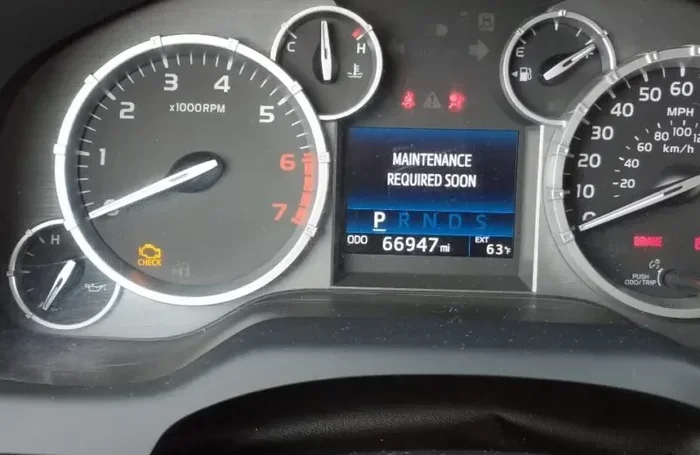
The Toyota Tundra maintenance light is a dashboard warning that tells you it is time for routine service. It usually looks like a small wrench or a service icon on your instrument panel. This light is part of the Toyota maintenance reminder system, which tracks your mileage and alerts you when scheduled maintenance is due.
Many people confuse this light with the check engine light or the oil pressure light. They are very different. The maintenance light is not a warning about a mechanical problem. It is simply a nudge saying, “Hey, you are due for an oil change or other scheduled service.” Still, ignoring it for too long can lead to missed maintenance, which could affect your truck’s performance over time.
What Triggers the Maintenance Light?
Several things can trigger the Toyota Tundra maintenance light to turn on:
- Mileage intervals: Most Toyota Tundras reset the maintenance light every 5,000 or 10,000 miles depending on your driving conditions.
- Oil change due: The most common reason. Your truck knows it is time for fresh oil.
- Time-based reminders: Even if you do not drive many miles, the light can come on after a certain period.
- Driving conditions: Short trips, towing, and extreme temperatures can shorten service intervals.
- After repairs: Sometimes the light stays on even after you have completed the service.
Understanding what triggers the light helps you know when to take action and when it is just a routine reminder. If you want to learn more about managing dashboard lights, check out our guide on how to get rid of the service light on my dashboard for additional tips.
Why Does the Maintenance Light Come On?
The Toyota Tundra maintenance light is designed to keep you on track with factory-recommended service intervals. Toyota engineers built this system into every Tundra to protect your engine and extend the life of your truck. Here is a closer look at why the light activates.
First, the system counts your miles from the last reset. Once you hit the preset mileage threshold, the light illuminates. Second, the light reminds you to inspect fluids, filters, belts, and other components that wear out over time. Third, it helps you maintain your truck’s resale value. A well-documented maintenance history makes a huge difference when it is time to sell or trade in.
If you have been putting off your oil change or other routine service, the maintenance light will keep reminding you until you address it. Think of it as your truck’s way of saying, “I need a little attention.”
How to Reset the Toyota Tundra Maintenance Light
Now for the part you have been waiting for. Resetting the Toyota Tundra maintenance light is straightforward, but the exact steps depend on your model year. We break it down below for older models, mid-range years, and the newest 2022-2024 Tundras.
Method 1: Using the Trip Meter (Older Models)
For Toyota Tundras from roughly 2000 to 2013, the reset process uses the trip meter on your instrument panel. Follow these steps carefully:
- Turn the ignition to the ON position. Do not start the engine. Just press the start button or turn the key to the “ON” setting.
- Locate the trip meter reset button. This is usually on the instrument panel or near the odometer.
- Press and hold the reset button. Hold it down firmly.
- Turn the ignition off and then back to ON. While holding the button, cycle the ignition.
- Continue holding the button for about 10 seconds. The maintenance light should start blinking.
- Release the button. The light should now be off.
- Start the engine and check. The maintenance light should no longer be visible on the dashboard.
If the light stays on, try repeating the steps. Sometimes it takes two attempts, especially if the truck was recently serviced. For older Tundra models, this method works about 90 percent of the time.
Method 2: Using the Instrument Panel Menu (2014 and Newer Models)
Newer Toyota Tundras have digital displays and menu systems that make the reset process a bit different. Here is how to do it on a 2014-2021 Tundra:
- Press the MENU button on the steering wheel. This brings up the vehicle settings.
- Navigate to the “Maintenance” or “Service” menu. Use the arrow buttons to scroll through the options.
- Select “Maintenance Reset.” This option may be labeled differently depending on your exact model year.
- Press and hold the OK button for several seconds. The system will confirm the reset.
- Turn the ignition off and back on. Check the dashboard to confirm the light is gone.
For the latest 2022-2024 Toyota Tundra models, the process is similar but may involve the touchscreen display. Go to Settings, then Vehicle Maintenance, and select Reset Maintenance Reminder. The 2024 Tundra has a very intuitive interface, so you should not need more than a minute to complete the reset.
Method 3: Using the Odometer Button (Some Model Years)
Some Toyota Tundra owners have found success using the odometer button combined with the trip reset. This method works on select model years:
- Turn the ignition to ON without starting the engine.
- Press the odometer button until the maintenance light appears on the display.
- Press and hold the trip meter reset button.
- Hold for about 10 seconds until the light flashes and then turns off.
- Release the button and turn the ignition off.
- Restart the engine to confirm the light is cleared.
This method is a bit less common, but it works well for certain Tundra years. If you are unsure which method applies to your truck, consult your owner’s manual. You can also learn more about general maintenance light resets in our article on how to reset my oil life, which covers similar reset procedures across Toyota models.
Common Problems When Resetting the Maintenance Light
Even though the reset process is simple, things do not always go smoothly. Here are some common issues Tundra owners face and how to solve them.
The Light Will Not Turn Off
This is the most common complaint. If the Toyota Tundra maintenance light stays on after you complete the reset steps, try these solutions:
- Repeat the reset process. Sometimes it takes two full attempts to clear the light completely.
- Check the ignition position. Make sure you are in the ON position, not the ACC or START position.
- Hold the button longer. Some models require a longer hold time than you expect.
- Disconnect the battery briefly. This resets the entire electrical system. Wait about 15 minutes before reconnecting.
The Light Comes Back Immediately
If the maintenance light returns right after you reset it, there may be an underlying issue. The truck’s computer might still detect that maintenance is overdue. In this case, you should actually complete the scheduled service first, then reset the light. This is especially common if you have not changed the oil or performed other required maintenance yet.
The Maintenance Light Blinks Instead of Staying Solid
A blinking maintenance light usually indicates a more urgent issue. It could mean your truck is due for service very soon or that there is a fault in the maintenance reminder system. If the light blinks continuously, we recommend visiting a Toyota dealer or qualified mechanic to run a diagnostic check.
Resetting the Light After an Oil Change
Many oil change shops will reset the maintenance light for you as part of the service. But if they forget or if you change your own oil, you will need to do it yourself. The good news is that the reset process is the same whether you just changed the oil or performed other maintenance. Just follow the steps for your model year, and the light will clear.
Want to stay on top of your truck’s service needs? Creating a maintenance schedule for your Toyota Tundra can help you avoid surprise maintenance lights and keep your truck running at its best.
Tips to Keep Your Toyota Tundra Running Smoothly
Resetting the maintenance light is just one part of owning a Toyota Tundra. Here are some practical tips to keep your truck in excellent condition between service visits.
- Check your oil regularly. Even if the maintenance light has not come on, checking your oil level every few weeks is a great habit.
- Keep a maintenance log. Write down every oil change, tire rotation, and service appointment. This helps you track your truck’s health and maintain its resale value.
- Use genuine Toyota parts. Aftermarket parts can work, but genuine Toyota parts are designed specifically for your truck.
- Watch for other dashboard lights. If the maintenance light comes with other warning lights, do not ignore them. Address issues promptly.
- Follow the owner’s manual. Your Tundra’s manual has a complete maintenance schedule tailored to your specific model year and driving conditions.
- Keep tires properly inflated. This improves fuel economy and reduces wear on your suspension and brakes.
Taking care of small things now saves you from bigger problems later. Your Toyota Tundra is built to last, and regular maintenance is the key to making it go the distance.
When to See a Professional
Most of the time, resetting the Toyota Tundra maintenance light is a quick DIY job. But there are situations where you should let a professional handle it.
If the maintenance light keeps coming back no matter how many times you reset it, there could be a deeper issue with the truck’s computer system. A Toyota dealer can run a diagnostic scan and check for stored trouble codes. Similarly, if the maintenance light appears alongside the check engine light or any other warning indicator, you should get the truck inspected right away.
Also, if you are not comfortable working with your truck’s electrical system, there is no shame in visiting a mechanic or a Toyota service center. A quick reset at the dealer is usually free, and it ensures the job is done correctly. You can also take your Toyota to any Toyota dealership for service, which is covered in our guide on can I take my Toyota to any dealer for service.
Toyota Tundra Maintenance Light Reset by Model Year
Not all Toyota Tundras are the same, and the reset process varies. Here is a quick comparison table to help you find the right method for your truck.
- 2000-2013 Tundra: Use the trip meter reset button method. Turn ignition ON, hold the trip reset button, cycle ignition, and hold for 10 seconds.
- 2014-2021 Tundra: Use the instrument panel menu method. Press MENU, navigate to Maintenance Reset, and hold OK.
- 2022-2024 Tundra: Use the touchscreen menu. Go to Settings, then Vehicle Maintenance, and select Reset Maintenance Reminder.
These are general guidelines. Always refer to your specific owner’s manual for the exact steps for your model year. If you have lost your manual, you can download a product manual online for free.
Preventing the Maintenance Light From Coming Back Too Soon
Once you have successfully reset the Toyota Tundra maintenance light, you probably want to keep it off until the next service interval. Here is how to prevent it from coming back too early.
- Complete all scheduled services on time. This includes oil changes, tire rotations, and fluid checks.
- Reset the light only after service is done. Resetting the light without completing the service will just bring it back.
- Track your mileage. Use a phone app or a notebook to log your miles between services.
- Drive consistently. Stop-and-go city driving wears your truck faster and can trigger the maintenance light sooner.
- Keep your truck clean. Regular washing and waxing protect the paint and undercarriage, which indirectly supports your truck’s overall health.
These habits might seem small, but they add up over the life of your truck. A well-maintained Toyota Tundra can easily last 300,000 miles or more with proper care.
Final Thoughts
Resetting the Toyota Tundra maintenance light is one of those simple tasks that every truck owner should know how to do. It saves you a trip to the dealer, saves you money, and gives you a sense of confidence in managing your vehicle. Whether you use the trip meter button method, the instrument panel menu, or the touchscreen display, the process is quick and straightforward.
Remember, the maintenance light is your friend. It reminds you to take care of your truck before small issues become big problems. Do not ignore it, but also do not panic when it comes on. Just follow the steps in this guide, reset the light, and get back on the road with peace of mind.
Keep your Toyota Tundra well-maintained, and it will reward you with years of reliable performance. Happy wrenching, and here is to many more miles ahead.
Frequently Asked Questions
Can I reset the Toyota Tundra maintenance light without starting the engine?
Yes, you can. Most reset methods require you to turn the ignition to the ON position without starting the engine. This gives you access to the trip meter and menu functions needed to clear the maintenance light. Starting the engine is not part of the reset process for any model year.
Why does my Toyota Tundra maintenance light keep coming back after I reset it?
This usually means the scheduled maintenance has not been completed yet. The truck’s computer tracks whether services like oil changes have actually been performed. If you reset the light without completing the service, it will return. Complete the required maintenance first, then reset the light again.
Is it safe to drive my Toyota Tundra with the maintenance light on?
Yes, it is generally safe. The maintenance light is a reminder for routine service, not an emergency warning. However, you should schedule service soon to avoid missing important maintenance like oil changes or fluid checks. If the light is accompanied by other warning indicators, have the truck inspected immediately.
How often does the Toyota Tundra maintenance light come on?
Most Toyota Tundras trigger the maintenance light every 5,000 to 10,000 miles, depending on your driving conditions and model year. The owner’s manual provides the specific interval for your truck. If you drive in severe conditions like towing or extreme heat, the light may come on more frequently.
Can I use an OBD2 scanner to reset the Toyota Tundra maintenance light?
Yes, an OBD2 scanner can reset the maintenance light on most Toyota Tundra model years. Plug the scanner into the diagnostic port under the dashboard, navigate to the maintenance reset function, and follow the on-screen prompts. This method works well if the manual reset steps do not succeed for your specific truck.
Do I need any special tools to reset the Toyota Tundra maintenance light?
No special tools are needed for most reset methods. You only need access to the trip meter buttons or the steering wheel controls, depending on your model year. For newer Tundras with touchscreen displays, the reset is done entirely through the infotainment system. An OBD2 scanner is optional but can be helpful for stubborn lights.
=== CONCLUSION ===
Resetting the Toyota Tundra maintenance light is a simple, fast, and rewarding DIY task. You do not need to visit a dealership or pay a mechanic to handle this small but important maintenance reminder. With the right method for your model year, you can clear the light in just a few minutes.
We covered everything from the older trip meter method to the latest touchscreen reset process for the 2024 Tundra. We also explored common problems, prevention tips, and when to seek professional help. The key takeaway is this: stay on top of your truck’s maintenance schedule, reset the light after each service, and your Toyota Tundra will serve you well for many years to come.
Now that you know exactly how to reset the maintenance light, you can handle it confidently the next time that little wrench icon appears on your dashboard. Your truck is counting on you, and with this guide, you are fully prepared to take care of it.