How Do I Turn Off the Maintenance Required Light on My Car
The maintenance required light is a common dashboard indicator that reminds drivers about upcoming car maintenance services. Turning off the maintenance required light is usually a simple process that involves resetting the trip meter or accessing the vehicle’s menu system. This guide covers the exact steps for different car brands, common causes, mistakes to avoid, and when to seek professional help.
That little yellow or orange light on your dashboard just popped up, and now you are staring at it every time you get behind the wheel. It says “Maintenance Required,” and it is nagging you like a persistent friend who keeps reminding you about a chore you have been putting off. We have all been there. The good news is that turning off the maintenance required light is usually a quick and straightforward process. You do not need to be a mechanic or own fancy tools. In this guide, we will walk you through everything you need to know, from understanding what the light means to resetting it on your specific vehicle. Let us get into it.
The maintenance required light is one of the most common dashboard indicators that drivers encounter. Unlike the check engine light, which signals a potential mechanical problem, this light is essentially a service reminder. It tells you that your vehicle is due for routine car maintenance based on mileage or time intervals. Most manufacturers set this light to trigger every 5,000 to 7,500 miles, depending on the brand and model. Understanding this distinction is important because it affects how you respond to the warning. Once you know what the light is actually telling you, the next step is figuring out how to turn it off after the service is done.
Key Takeaways
- Easy Reset Process: Most cars let you turn off the maintenance required light by pressing and holding the trip meter reset button while turning the key.
- Know the Difference: The maintenance required light is not the same as the check engine light. Each signals a different type of issue.
- Common Causes: Oil changes, service intervals, and battery issues are the most frequent triggers for this warning light.
- Avoid Common Mistakes: Don’t ignore the light or reset it without actually completing the needed service.
- Brand-Specific Steps: Toyota, Honda, and other brands have slightly different reset procedures. Always check your owner’s manual.
- Prevention Helps: Following your maintenance schedule can prevent the light from coming back frequently.
📑 Table of Contents
- What Is the Maintenance Required Light?
- Common Causes of the Maintenance Required Light
- How to Turn Off the Maintenance Required Light
- Common Mistakes When Resetting the Maintenance Light
- When Should You See a Professional?
- Preventing the Maintenance Light from Coming Back Too Soon
- Quick Tips for a Smooth Reset
- Final Thoughts
What Is the Maintenance Required Light?
Understanding Your Dashboard Indicator
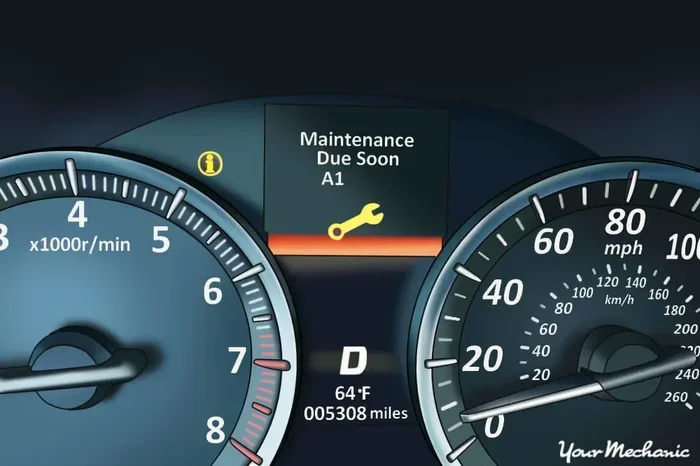
Every car has a collection of warning lights on the dashboard, and each one serves a specific purpose. The maintenance required light is often shaped like a wrench or the letters “MAINT.” It is designed to remind you that your vehicle needs scheduled service based on the manufacturer’s recommended maintenance schedule. This is not an emergency signal. It is more like a calendar notification for your car.
The light typically activates after you have driven a certain distance since the last service. For many Toyota and Honda models, this is around 5,000 miles. For other brands, it could be 7,500 or even 10,000 miles. The service interval is programmed into the vehicle’s computer system, and the light comes on to prompt you to visit a service center or perform vehicle maintenance yourself.
How It Differs from the Check Engine Light
It is easy to confuse the maintenance required light with the check engine light, but they are very different. The check engine light indicates a potential problem with your engine, emissions system, or other critical components. The maintenance required light is purely a reminder for routine oil change or service intervals. To learn more about the differences, check out our detailed guide on the difference between a check engine light and a maintenance required light.
Here is a quick comparison of the two lights:
- Maintenance Required Light: Indicates scheduled service is due. Not urgent. Safe to drive. Triggered by mileage or time.
- Check Engine Light: Indicates a potential mechanical or emissions issue. Could be urgent. Should be diagnosed promptly. Triggered by sensor readings.
Knowing this difference helps you decide how quickly you need to act. If the maintenance light comes on, you have time to schedule a service. If the check engine light is flashing, you should pull over and investigate immediately.
Common Causes of the Maintenance Required Light
Oil Change Reminder
The most common reason the maintenance required light comes on is that your oil change is due. Engine oil breaks down over time and loses its ability to lubricate moving parts effectively. When the oil change interval is reached, the vehicle’s computer triggers the light as a reminder. This is a straightforward cause, and a simple oil change will usually resolve it.
Scheduled Service Intervals
Beyond oil changes, your car has a list of recommended services at specific mileage points. These include tire rotations, brake inspections, fluid replacements, and filter changes. When any of these service intervals are reached, the maintenance light may activate. The light serves as a nudge to keep up with your car maintenance routine.
Battery and Electrical Issues
Sometimes the light comes on due to electrical gremlins. A weak or failing battery can cause various dashboard warnings, including the maintenance light. If you notice the light appearing alongside other electrical issues, it is worth investigating further. Our article on can a bad battery cause the wrench light to come on explores this topic in detail.
Aftermarket Modifications or Sensor Errors
In some cases, aftermarket modifications or faulty sensors can trigger the maintenance light even when no service is actually needed. This is less common but does happen. If you have recently installed new parts or your vehicle has been through a rough event, a sensor error might be the culprit.
How to Turn Off the Maintenance Required Light
Now for the part you have been waiting for. Turning off the maintenance required light is a process that varies slightly depending on your vehicle’s make and model. Below, we cover the most common methods used across popular brands.
Method 1: The Trip Meter Reset (Most Common)
This method works for the majority of vehicles, including most Toyota, Honda, and Nissan models. Here is how to do it:
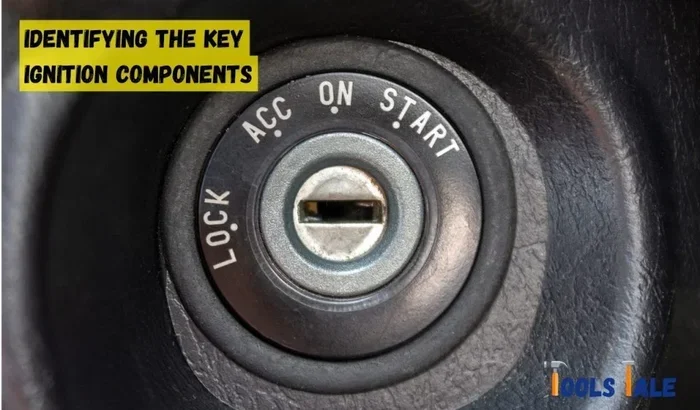
- Turn the ignition key to the “ON” position. Do not start the engine.
- Locate the trip meter reset button on your dashboard or steering column.
- Press and hold the reset button.
- While holding the button, turn the ignition key to the “OFF” position and then back to “ON.”
- Continue holding the button for about 10 to 15 seconds.
- The light should blink and then turn off. Release the button.
- Start the engine to confirm the light is off.
For many drivers, this is all it takes. The trip meter reset method is the go-to approach for most vehicles. If you are unsure about your specific model, consult your owner’s manual for guidance.
Method 2: Using the Steering Wheel Controls
Newer vehicles, especially those from 2015 and beyond, often have digital displays and steering wheel controls. In these cars, the reset process involves navigating through the onboard menu:
- Press the “Menu” or “Settings” button on the steering wheel.
- Scroll to the “Maintenance” or “Vehicle Settings” option.
- Select “Reset Maintenance Light” or a similar option.
- Confirm the reset when prompted.
This method is slightly more involved but follows the same basic logic. The vehicle’s computer needs to be told that the service has been completed and the service interval needs to be reset.
Method 3: Using an OBD-II Scanner
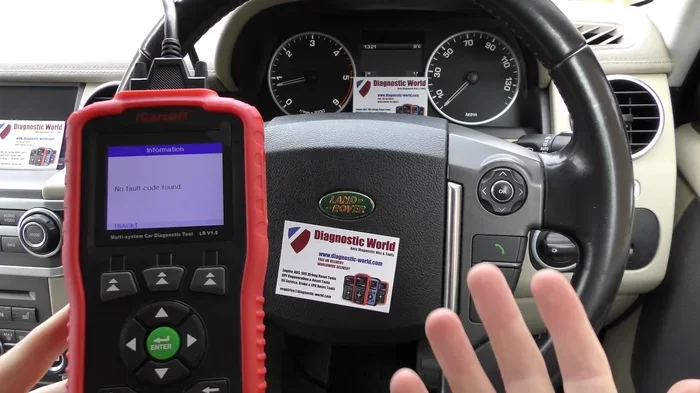
For vehicles where the above methods do not work, an OBD-II scanner can be a lifesaver. This small device plugs into the diagnostic port under your dashboard and communicates with the vehicle’s computer. You can use it to clear warning lights, including the maintenance required light. Many auto parts stores offer free OBD-II scans if you do not want to purchase your own scanner.
Brand-Specific Reset Instructions
Different brands have slightly different procedures. Here is a quick overview:
- Toyota: Use the trip meter reset method. For some models, you may need to hold the trip meter reset stalk for an extended period while cycling the ignition.
- Honda: Similar to Toyota, the trip meter reset button method works for most Honda models.
- Ford: Ford vehicles often require navigating through the instrument cluster menu to reset the maintenance light.
- Chevrolet: Most Chevrolet models use the trip odometer reset button method.
For a more detailed walkthrough on resetting oil change lights specifically, you can refer to our guide on do you reset the oil change light. It covers brand-specific steps in greater detail.
Common Mistakes When Resetting the Maintenance Light
Resetting the maintenance light seems simple, but people make mistakes that can cause frustration or even damage. Here are the most common errors to avoid:
Resetting Without Completing the Service
This is the biggest mistake. The maintenance light exists for a reason. If your oil change is due, get the oil changed first, and then reset the light. Turning off the maintenance required light without actually doing the service is like ignoring a fire alarm because you do not want to deal with it. The underlying issue still exists.
Holding the Button Too Short
Many people release the trip meter reset button too quickly. The process usually requires holding the button for 10 to 15 seconds. If you let go too early, the reset will not register. Be patient and hold it long enough.
Turning the Ignition to the Wrong Position
Make sure you are moving the key to the correct positions during the reset process. Going from “ON” to “ACC” instead of “OFF” and back to “ON” will not work. Follow the steps carefully and in the correct order.
Using the Wrong Reset Method for Your Vehicle
Not all cars use the trip meter reset method. Some require the steering wheel controls or a menu navigation. Using the wrong method will not work and can be confusing. Always verify the correct procedure for your specific make and model.
Ignoring the Light After Resetting
If the maintenance light comes back shortly after you reset it, something is wrong. Do not just reset it again and ignore it. The light may be telling you about a real issue that needs attention. Persistent lights after a reset warrant a visit to a professional.
When Should You See a Professional?
In most cases, turning off the maintenance required light is a DIY task. However, there are situations where professional help is the right call:
- The light keeps coming back after you reset it multiple times.
- The light appears alongside other warning lights, such as the check engine light or oil pressure light.
- You are unsure about the reset procedure for your specific vehicle.
- You suspect an electrical or sensor issue rather than a simple service reminder.
- Your vehicle is still under warranty, and you want to ensure proper service documentation.
A certified mechanic or dealership technician can diagnose the root cause and ensure the light is properly addressed. For Toyota owners wondering about service options, our article on can I take my Toyota to any dealer for service provides helpful guidance on service flexibility.
Preventing the Maintenance Light from Coming Back Too Soon
Once you have successfully reset the light, you probably want to keep it off until the next legitimate service interval. Here are some tips to help with that:
- Keep a Maintenance Log: Track your oil changes, tire rotations, and other services in a notebook or app. This helps you stay on top of your maintenance schedule and avoid surprises.
- Follow the Manufacturer’s Recommendations: Every vehicle has a recommended service interval. Stick to it, and the light will only come on when it should.
- Use Quality Parts and Fluids: Cheap oil or inferior parts can lead to more frequent service needs and potentially trigger warning lights.
- Address Electrical Issues Promptly: If you notice any electrical problems, get them checked before they trigger dashboard warnings.
- Do Not Ignore Other Warning Lights: Other dashboard indicators can sometimes interact with the maintenance system. Address all warnings promptly.
Taking a proactive approach to vehicle maintenance not only keeps the maintenance light off but also extends the life of your car. Regular oil changes, fluid top-offs, and inspections go a long way in preventing unexpected issues.
Quick Tips for a Smooth Reset
- Always complete the service before resetting the light.
- Have your owner’s manual handy for model-specific instructions.
- Make sure the vehicle is stationary and the parking brake is engaged.
- Do not reset the light while driving.
- If the first method does not work, try the second or third method before seeking professional help.
- Keep a record of when you reset the light for future reference.
Resetting the maintenance light is one of those small car care tasks that anyone can do with a little patience. It saves time and money compared to a dealership visit, and it gives you a better understanding of your vehicle. Once you have done it a couple of times, it becomes second nature.
Final Thoughts
The maintenance required light is your car’s way of telling you it is time for some routine care. It is not something to fear or ignore, but it is also not something to leave on indefinitely. Turning off the maintenance required light after completing the necessary service keeps your dashboard clean and your maintenance schedule on track. Whether you use the trip meter reset method, the steering wheel controls, or an OBD-II scanner, the process is manageable for virtually any driver.
Remember, the light is a helpful tool, not a nuisance. It keeps you on top of your car maintenance and helps prevent neglect that could lead to bigger problems down the road. The next time that wrench icon lights up on your dashboard, you will know exactly what to do. Complete the service, reset the light, and drive with confidence knowing your vehicle is in good shape.
Stay proactive with your vehicle’s care, and the maintenance light will only ever be a brief reminder rather than a constant worry. Keep this guide bookmarked for the next time the light comes on, and you will be all set.
Frequently Asked Questions
How do I turn off the maintenance required light after an oil change?
After completing your oil change, turn the ignition to the “ON” position without starting the engine. Press and hold the trip meter reset button, then cycle the key to “OFF” and back to “ON.” Hold the button for 10 to 15 seconds until the light blinks and turns off. For more details on this process, check out our guide on do you have to reset the light after an oil change.
Can I drive with the maintenance required light on?
Yes, the maintenance required light is not an urgent warning. It simply reminds you that a service is due. You can safely drive to the nearest service center or schedule an appointment. However, do not ignore it for extended periods, as overdue maintenance can affect your vehicle’s performance and longevity.
Why does the maintenance required light keep coming back after I reset it?
If the light returns shortly after resetting, it usually means the service was not completed properly or the reset was not performed correctly. Double-check that the service was done and try the reset process again. If it persists, there may be an underlying electrical or sensor issue that needs professional diagnosis.
Is the maintenance required light the same as the oil change light?
They are closely related but not exactly the same. The maintenance required light is a general service reminder that can be triggered by oil changes, fluid checks, tire rotations, and other scheduled services. The oil change light specifically indicates that an oil change is due. Many vehicles use the maintenance required light for both purposes.
What should I do if the maintenance required light comes on and I do not have time for service?
If you cannot get to a service center immediately, you can continue driving for a short distance. However, avoid pushing it too far beyond the recommended interval. Check your owner’s manual for the specific mileage tolerance for your vehicle. If the light is accompanied by other warning signs, address it as soon as possible.
Can I use an OBD-II scanner to turn off the maintenance required light?
Yes, an OBD-II scanner can be used to clear the maintenance required light on most vehicles. Plug the scanner into the diagnostic port under your dashboard, read any codes, and use the scanner’s menu to clear the maintenance light. This method is especially useful for vehicles where the trip meter reset method does not work.
=== META DESCRIPTION ===
Learn how to turn off the maintenance required light on your car with simple step-by-step instructions. Discover causes, reset methods, and expert tips.