How to Reset Oil Life on a 2017 Honda Civic Made Easy
Resetting the oil life on a 2017 Honda Civic is a quick and easy process you can do at home. This guide walks you through every step with clear instructions and helpful tips. You will learn what the oil life system means and how to keep your Civic running smoothly between oil changes.
Owning a 2017 Honda Civic comes with many perks. It is a reliable car that delivers great fuel economy and a smooth ride. But like any vehicle, it needs regular care. One of the simplest yet most overlooked tasks is resetting the oil life indicator. If you have ever seen that little wrench light on your dashboard and wondered what to do, you are in the right place. This guide will show you exactly how to reset oil life on a 2017 Honda Civic in just a few easy steps.
The oil life system is not the same as an oil change reminder. It is a smart computer system that tracks your driving habits and engine conditions. It uses factors like driving time, temperature, and RPM to decide when your oil needs changing. When the system thinks the oil is worn out, it triggers a warning. Resetting it after an oil change tells the system to start fresh. This keeps your maintenance schedule accurate and your engine protected.
Many people skip this step or pay a mechanic just to do it. That is a waste of time and money. With this guide, you will learn the exact buttons to press and the order to follow. Whether you have the base model or a sport trim, the process is similar. Let us dive in and walk through it together.
Key Takeaways
- Easy DIY Process: You can reset the oil life on a 2017 Honda Civic in under five minutes without any special tools.
- No Mechanic Needed: The reset procedure is straightforward and does not require a dealership visit.
- Saves Money: Doing it yourself avoids unnecessary service fees and keeps you informed about your car.
- Multiple Methods Available: There are different ways to reset the oil life depending on your Civic trim and display type.
- Regular Maintenance Matters: Resetting the oil life helps you track service intervals and keep your engine healthy.
- Related Car Care: Understanding your oil life system connects to broader maintenance like preventing overheating and checking battery reset codes.
📑 Table of Contents
- Understanding the Oil Life System on a 2017 Honda Civic
- Tools and Preparation You Need
- Step-by-Step Guide to Reset Oil Life on a 2017 Honda Civic
- Common Problems and How to Fix Them
- How Often Should You Reset the Oil Life?
- Tips for Keeping Your 2017 Honda Civic Engine Healthy
- Why You Should Never Ignore the Oil Life Warning
- Final Thoughts
Understanding the Oil Life System on a 2017 Honda Civic
Before you reset anything, it helps to understand what the system does. The 2017 Honda Civic uses an intelligent oil life monitor. It is not just a simple timer. The system analyzes your actual driving conditions to estimate oil quality.
How the Oil Life Monitor Works
The monitor tracks several factors. It looks at engine temperature, driving speed, idle time, and stop-and-go patterns. If you drive in harsh conditions like heavy traffic or extreme heat, the system adjusts the oil change interval. This is actually a good thing. It means your oil gets changed when it really needs it, not just based on mileage alone.
The oil life percentage starts at 100 percent after a reset. It gradually decreases as you drive. When it hits around 15 percent, the system will remind you to service the vehicle. Once it reaches zero, the wrench light stays on continuously. At that point, you should not delay the oil change.
Why Resetting Matters
Resetting the oil life after an oil change is crucial. If you do not reset it, the old percentage stays on the display. This can confuse you about when the next service is due. It also means the system is tracking oil quality based on old data. A proper reset ensures your maintenance schedule stays accurate and your engine stays healthy.
Tools and Preparation You Need
One of the best things about this reset process is that you need almost nothing. No special tools. No expensive equipment. Just your Honda Civic and a few minutes of your time.
What You Will Need
- A 2017 Honda Civic with a functioning dashboard display
- The ignition key or push-button start
- Your owner’s manual (optional but helpful for reference)
- Fresh engine oil if you are doing the oil change at the same time
When to Reset
The best time to reset is right after an oil change. The technician or you will have just put in fresh oil. The system needs to know this so it can start a new tracking cycle. You should also reset if you accidentally clear the display or if the percentage drops without an actual oil change.
Make sure your car is parked in a safe, flat area. Turn off all accessories like the radio or air conditioning before you start. This ensures the system registers a clean reset without interference.
Step-by-Step Guide to Reset Oil Life on a 2017 Honda Civic
Now for the part you have been waiting for. The actual reset process. I will walk you through each step clearly so you can follow along without any confusion.
Method 1: Using the Steering Wheel Controls
This is the most common method for the 2017 Honda Civic. Most trims use the steering wheel buttons to navigate the dashboard display.
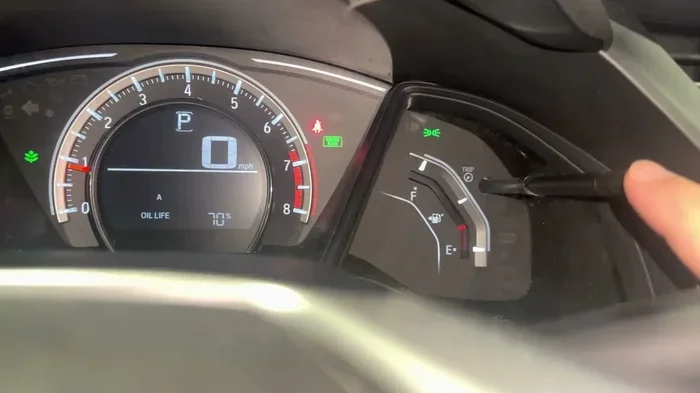
- Turn the ignition to ON. Do not start the engine. Just push the start button once or turn the key to the ON position. The dashboard lights will come on but the engine stays off.
- Press the MENU button on the steering wheel. This brings up the main settings menu on the information display.
- Use the up and down arrows to scroll. Look for the “Settings” or “Vehicle Settings” option. Press the SELECT button to enter.
- Find the Maintenance menu. Scroll down until you see “Maintenance” or “Oil Life Reset.” Press SELECT again.
- Choose Reset Oil Life. The system will ask you to confirm. Select “Yes” or “Reset” to proceed.
- Turn the ignition OFF and then ON again. This completes the reset. The oil life percentage should now read 100 percent.
If the wrench light is still on after the reset, do not worry. Sometimes the light takes a moment to clear. Turn the car off, wait ten seconds, and turn it back on. The light should go away and the percentage should display 100.
Method 2: Using the Information Display Buttons
Some 2017 Honda Civic models have a slightly different setup. If your car does not have steering wheel controls, you can use the buttons on the dashboard itself.
- Turn the ignition to ON. The display screen will activate.
- Press the Info button repeatedly. Cycle through the display options until you see the maintenance menu.
- Press and hold the Reset button. Hold it for about five seconds. The oil life indicator should start to blink.
- Release the Reset button. Then press and hold it again for another five seconds.
- The reset is complete when the display shows 100 percent.
Both methods work equally well. If one does not seem to work for your specific trim, try the other. The 2017 Civic has small variations between models, but the core process is the same.
Common Problems and How to Fix Them
Sometimes the reset does not go as planned. This is normal and usually easy to fix. Here are the most common issues people run into and how to solve them.
The Wrench Light Will Not Turn Off
This is the number one complaint. After resetting, the wrench light stays on. In most cases, this happens because the reset was not fully completed. Try turning the ignition off, waiting thirty seconds, and turning it back on. If that does not work, repeat the reset process from the beginning. Make sure you are pressing the right buttons in the correct order.
The Oil Life Percentage Will Not Reset to 100
If the percentage stays low or resets partially, the system may not have registered the change. This can happen if you turned the ignition off too quickly. Follow the steps carefully and give the system a few seconds between each action. Sometimes you need to do the reset twice for it to take effect.
The Display Shows a Maintenance Code Instead
In some cases, the system shows a code like “MAINT REQD” instead of a percentage. This is common on older Honda models and some 2017 trims. The reset process is the same. Navigate to the maintenance menu and select reset. The code should clear after the reset is confirmed.
If you are dealing with other car codes or lights, understanding how diagnostic systems work can help. For example, learning about how to read ABS codes without a scanner gives you a broader understanding of your vehicle’s warning systems.
How Often Should You Reset the Oil Life?
You should reset the oil life every time you get an oil change. This is the golden rule. Whether you change the oil yourself or visit a shop, the reset tells the system that fresh oil is now in the engine.
The 2017 Honda Civic typically needs an oil change every 7,500 to 10,000 miles under normal driving conditions. However, if you drive in severe conditions, you may need to change it more often. Severe conditions include frequent short trips, towing, extreme temperatures, or heavy traffic.
Some people wonder if they can reset the oil life without actually changing the oil. The answer is no. You should only reset the system after fresh oil has been added. Resetting without an oil change clears the warning but leaves old oil in the engine. This can lead to engine wear over time.
Tracking Your Maintenance Schedule
Keeping track of oil changes helps you stay on top of your car’s health. You can use a simple notebook or a phone app. Write down the date, mileage, and type of oil used. This makes it easy to know when the next change is due. It also helps if you ever sell the car, since a full maintenance record adds value.
Tips for Keeping Your 2017 Honda Civic Engine Healthy
Resetting the oil life is just one part of engine care. Here are some extra tips to keep your Civic running strong for years to come.
- Use the right oil. Check your owner’s manual for the recommended oil weight. Most 2017 Civics work best with 0W-20 synthetic oil.
- Check oil levels regularly. Get in the habit of checking the dipstick once a month. Low oil can cause serious engine damage.
- Watch for warning signs. If you notice strange noises, dark oil, or a burning smell, get your car checked right away.
- Keep up with other maintenance. Oil changes work best when paired with regular tire rotations, brake checks, and fluid top-offs.
- Drive gently when the engine is cold. Give your car a few minutes to warm up before pushing it hard. This lets the oil circulate properly.
Taking care of your engine also connects to other aspects of car health. For instance, maintaining proper fluid levels and cooling systems ties into broader care like preventing your car from overheating in summer. These habits all work together to keep your vehicle reliable.
Quick Tips for a Smooth Reset
- Always reset the oil life immediately after an oil change
- Make sure the ignition is in the ON position, not START
- Wait for the system to fully respond before moving to the next step
- If the first attempt fails, try again after a 30-second pause
- Keep your owner’s manual nearby for model-specific details
Why You Should Never Ignore the Oil Life Warning
The oil life warning is there for a reason. It is not just a nuisance light. It is your car telling you that the oil is no longer performing at its best. Old oil loses its ability to lubricate, cool, and clean the engine. Ignoring the warning can lead to increased wear, reduced fuel efficiency, and even engine failure in extreme cases.
The cost of an oil change is small compared to the cost of engine repairs. A basic oil change might cost you between $40 and $80. A new engine can cost thousands. The math is clear. Always take the oil life warning seriously and reset it after you have addressed it.
If you are shopping for a used car or considering whether your current vehicle is worth the investment, understanding maintenance like oil life resets adds to your knowledge. Resources like how to know if a car is a good deal can help you evaluate a vehicle’s overall health and maintenance history.
Final Thoughts
Resetting the oil life on a 2017 Honda Civic is one of the simplest things you can do as a car owner. It takes less than five minutes and requires no special skills or tools. Once you have done it a couple of times, it becomes second nature. You will never need to pay a shop just to clear that annoying wrench light again.
The key is to do it right after every oil change. This keeps your maintenance tracking accurate and your engine protected. Follow the steps in this guide carefully, and you will have no trouble at all. Your 2017 Honda Civic will thank you with smooth performance and long-lasting reliability.
Take a few minutes today to familiarize yourself with your car’s display system. Open the menus, explore the settings, and find the oil life reset option. The more comfortable you are with your vehicle, the better you can care for it. And caring for your car is one of the best ways to protect your investment and enjoy safe, worry-free driving for miles to come.
Frequently Asked Questions
How do I know when to reset the oil life on my 2017 Honda Civic?
You should reset the oil life immediately after getting an oil change. The system tracks oil quality based on driving conditions, and a fresh oil change means the cycle starts over. Always reset after servicing, not before.
Can I reset the oil life without changing the oil?
You can, but you should not. Resetting without an oil change clears the warning light but leaves old oil in the engine. This can lead to poor engine performance and increased wear over time. Always change the oil first.
What if the wrench light stays on after I reset the oil life?
This usually means the reset was not fully completed. Try turning the ignition off, waiting thirty seconds, and turning it back on. If the light persists, repeat the reset process carefully, making sure you follow each step in order.
Does resetting the oil life affect my Honda warranty?
No, resetting the oil life has no effect on your warranty. It is a simple maintenance function built into the car’s computer system. However, keeping accurate records of your oil changes is important for warranty claims.
How often does the 2017 Honda Civic need an oil change?
Under normal driving conditions, the 2017 Honda Civic needs an oil change every 7,500 to 10,000 miles. If you drive in severe conditions like extreme heat, heavy traffic, or frequent short trips, you may need to change it more often, around every 5,000 miles.
Is resetting the oil life the same as resetting the maintenance light?
Yes, in most cases they are the same thing. The Honda Civic uses a single maintenance system that tracks both the oil life percentage and the general service reminder. Resetting the oil life also clears the maintenance light on the dashboard.
=== CONCLUSION ===
Resetting the oil life on a 2017 Honda Civic is a simple task anyone can do at home. With the steps outlined in this guide, you now have the knowledge and confidence to handle it yourself. No mechanic fees, no waiting, no hassle. Just a few minutes of your time and your car stays on track with its maintenance schedule.
Remember to reset after every oil change, use the right oil for your engine, and never ignore the warning signs. Your 2017 Honda Civic is a dependable machine that rewards good care with years of reliable service. Take charge of your car’s maintenance today and enjoy the peace of mind that comes with knowing you are doing right by your vehicle.