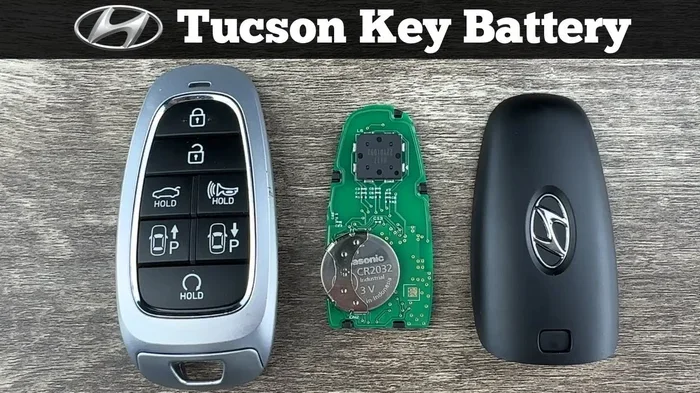
How to Change the Battery in a 2018 Hyundai Tucson Key Fob
Changing the battery in your 2018 Hyundai Tucson key fob is a simple DIY task you can finish in minutes. You just need a CR2032 coin cell battery, a small flathead screwdriver, and a steady hand. This guide walks you through every step, from opening the fob to testing the remote after the swap, so you can save time and money without visiting a dealer.
Your 2018 Hyundai Tucson key fob stopped working at the worst possible moment. Maybe you were standing in the grocery store parking lot, or you were trying to unlock your car in the rain. Whatever the situation, a dead key fob battery is frustrating, but it is also something you can fix yourself in just a few minutes.
This guide covers everything you need to know about how to change the battery in a 2018 Hyundai Tucson key fob. From the tools you need to the step-by-step process, we have you covered. You will also learn how to pick the right replacement battery, avoid common mistakes, and troubleshoot issues if the fob still does not work after the swap.
You do not need any special skills or expensive tools. Whether you have never opened a key fob before or you have done it a hundred times, this guide will walk you through it clearly and simply. Let us get started.
Key Takeaways
- Easy DIY Job: You can change the battery yourself in under 10 minutes with basic tools.
- Right Battery Matters: The 2018 Tucson key fob uses a CR2032 coin cell battery, and choosing a quality brand ensures reliable performance.
- Know the Warning Signs: Reduced range, delayed response, and intermittent working are clear signals your battery is dying.
- Avoid Common Mistakes: Forcing the fob open, using the wrong battery type, and skipping post-replacement steps can cause problems.
- Post-Replacement Steps Are Important: Resetting and testing the fob after the battery swap ensures everything works correctly.
- When in Doubt, Seek Help: If the fob still fails after a battery change, a dealership or locksmith can diagnose deeper issues.
📑 Table of Contents
- What You Need Before You Start
- Step-by-Step Guide to Changing the Battery
- Signs Your 2018 Hyundai Tucson Key Fob Battery Is Dying
- Choosing the Right Replacement Battery
- Common Mistakes to Avoid When Changing Your Key Fob Battery
- What to Do If the Key Fob Still Does Not Work After a Battery Change
- How to Maintain Your Key Fob for Longevity
- Conclusion
What You Need Before You Start
Before you dive into the process, gather everything you need. Having the right tools and replacement battery ready saves time and prevents frustration. Here is your checklist:
- CR2032 coin cell battery: This is the exact battery type used in the 2018 Hyundai Tucson key fob. You can find it at most hardware stores, pharmacies, and online retailers.
- Small flathead screwdriver: A tiny flathead screwdriver works best for prying open the fob shell. You can also use a thin plastic prying tool to avoid scratching the casing.
- Clean, flat workspace: A table or desk with good lighting makes the process much easier. A soft cloth underneath prevents small parts from rolling away.
- Good lighting: You need to see the tiny internal components clearly. A desk lamp or even your phone flashlight works great.
- Patience: The fob clips are small and can be tricky. Take your time and do not force anything.
Why the CR2032 Battery?
The CR2032 is one of the most common coin cell batteries in the world. It provides 3 volts of power, which is exactly what your Tucson key fob needs to communicate with your car. These batteries are inexpensive, usually costing between one and three dollars, and they last anywhere from one to two years depending on how often you use the remote.
If you are unsure about which battery to buy, look for reputable brands like Energizer, Duracell, or Panasonic. Cheaper generic brands sometimes have a shorter lifespan, so spending a little extra on a trusted name can save you from swapping batteries again too soon.
Step-by-Step Guide to Changing the Battery
Now that you have everything ready, let us walk through the actual process of replacing the battery in your 2018 Hyundai Tucson key fob. Follow these steps carefully, and you will have a working remote in no time.
Step 1: Remove the Key Blade
The 2018 Tucson key fob has a hidden key blade inside it. Before you can open the fob, you need to release this blade first. Look for a small button or slider on the side of the fob. Press or slide it, and the key blade will pop out.
Set the key blade aside in a safe place. You do not need it for the battery replacement, but you will want it back once you are done. Some fob designs also use the key blade as part of the opening mechanism, so keep it nearby.
Step 2: Locate and Open the Seam
With the key blade removed, look closely at the fob shell. You will notice a thin seam running along the middle of the fob. This is where the two halves of the casing meet. Insert your small flathead screwdriver or plastic prying tool into this seam.
Start at one corner and gently work your way around the perimeter. The clips holding the two halves together are small but sturdy. Do not force the screwdriver in too deep or at too steep an angle. Gentle, steady pressure is all you need.
Once you feel the clips release, carefully separate the two halves of the fob. Set the top half aside with the buttons facing up so nothing falls out.
Step 3: Remove the Old Battery
Inside the fob, you will see the old CR2032 battery sitting in a small compartment. It is usually held in place by a tiny metal clip or just friction from the shell. Take note of which side of the battery faces up before you remove it. The positive side, marked with a plus sign and the number 2032, should be facing up.
Use your screwdriver or a small pair of tweezers to gently pop the old battery out. If there is a metal clip holding it in place, carefully lift the clip first. Dispose of the old battery properly. Do not throw it in your regular trash, as coin cell batteries contain materials that should be recycled.
Step 4: Insert the New Battery
Take your new CR2032 battery out of its packaging. Hold it with the positive side facing up and carefully place it into the compartment. Make sure the battery sits flat and is fully seated in the slot.
If there is a metal clip, gently press it back down over the battery to secure it. Give the battery a light nudge to make sure it is not loose. A poorly seated battery can cause intermittent issues that are hard to diagnose.
Step 5: Reassemble the Fob
Now it is time to put the fob back together. Align the two halves of the casing carefully. Start by snapping the bottom half into place, then press the top half down firmly. You should hear or feel the clips click into position along the seam.
Run your finger around the edge of the fob to make sure the two halves are fully seated. A gap anywhere along the seam can allow moisture or dust to get inside, which can damage the internal components over time.
Slide the key blade back into the fob until it clicks. Give the whole fob a gentle squeeze to make sure everything feels solid and secure.
Step 6: Test the Key Fob
This is the most satisfying part. Stand near your 2018 Hyundai Tucson and test every function of the key fob. Press the lock button, the unlock button, the trunk release, and the panic button if your fob has one.
Make sure the range is good by stepping back a few paces and testing again. The fob should work reliably from at least 20 to 30 feet away. If all functions work and the range feels normal, you have successfully completed the battery replacement.
However, if the fob still does not work, do not panic. There are a few things you can check before seeking professional help. We will cover troubleshooting in detail later in this guide. And if you want to learn more about what to do after replacing a key fob battery, check out our guide on what to do after replacing a key fob battery.
Signs Your 2018 Hyundai Tucson Key Fob Battery Is Dying
One of the best ways to avoid being caught off guard by a dead key fob is to recognize the warning signs early. Most key fob batteries give you plenty of notice before they completely die. Here are the most common signs that your Tucson key fob battery needs replacing:
Reduced Range
This is usually the first sign you will notice. If you used to unlock your car from 30 feet away and now you need to stand right next to the door, the battery is weakening. The signal from the key fob becomes weaker as the battery drains, so the effective range shrinks over time.
Delayed Response
When you press a button on the fob, you expect an instant response. If there is a noticeable delay between pressing the button and the car responding, the battery may not be delivering enough power to send a strong signal. This is especially noticeable when you are trying to lock or unlock from a distance.
Intermittent Function
A dying battery often causes the key fob to work inconsistently. Sometimes the buttons work fine, and other times they do nothing at all. This happens because the battery voltage drops below the threshold needed for reliable communication with the car. If you find yourself pressing the button multiple times before it works, it is time for a new battery.
Warning Indicator on the Dashboard
Some 2018 Hyundai Tucson models have a dashboard warning light that illuminates when the key fob battery is low. If you see a key-shaped icon or a battery warning on your instrument cluster, do not ignore it. This is your car telling you that the fob battery needs attention soon.
Key Fob Not Working at All
If the fob has completely stopped working, the battery is almost certainly dead. Before you assume the worst, try replacing the battery. In most cases, a dead fob simply needs a fresh battery. If the fob still does not work after a battery change, there may be a deeper issue that requires professional diagnosis.
For more information about what happens when a key fob battery dies and whether it can drain your car battery, read our article on can a bad key fob drain your car battery.
Choosing the Right Replacement Battery
Not all batteries are created equal, and choosing the right one for your 2018 Hyundai Tucson key fob makes a real difference in performance and longevity. Here is what you need to know:
CR2032 vs. Other Battery Types
The 2018 Tucson key fob specifically requires a CR2032 battery. Do not substitute a CR2025 or CR2016, even though they look similar. These batteries have different voltages and sizes, which can cause the fob to malfunction or not work at all. Always double-check the battery type printed on your old battery before purchasing a replacement.
Brand Recommendations
When it comes to key fob batteries, brand quality matters. Here are some reliable options:
- Energizer CR2032: Known for long-lasting performance and consistent voltage output. A great all-around choice.
- Duracell CR2032: Another trusted brand that offers reliable power and widely available at most stores.
- Panasonic CR2032: Often preferred by automotive enthusiasts for their stable discharge rate.
- Generic Store Brands: These can work fine in a pinch, but they may not last as long as name-brand batteries.
Where to Buy
CR2032 batteries are available almost everywhere. You can find them at grocery stores, pharmacies, auto parts stores, and online marketplaces. Buying in bulk is a smart move since these batteries have a long shelf life and you will likely need them again in the future.
If you want to learn more about replacing key fob batteries on your own, our article on can you replace a car key fob battery yourself covers the general process across different vehicle models.
How Long Does a Key Fob Battery Last?
On average, a key fob battery lasts between 12 and 24 months. However, this varies based on how frequently you use the remote, the distance you live from your car, and environmental factors like extreme temperatures. If you live in a very cold or very hot climate, the battery may drain faster.
One thing to keep in mind: if you have a spare key fob that you rarely use, its battery can still last for years. The more you press the buttons, the faster the battery depletes. It is a good idea to replace both fob batteries at the same time if you have two, so you are never caught off guard.
Common Mistakes to Avoid When Changing Your Key Fob Battery
Changing a key fob battery is straightforward, but small mistakes can lead to big problems. Here are the most common errors people make and how to avoid them:
Forcing the Fob Open
The biggest mistake is using too much force when prying the fob open. The plastic clips are delicate and can break easily. If you feel resistance, stop and reposition your tool. Forcing the fob can crack the casing, which exposes the internal electronics to moisture and dust.
Installing the Battery Upside Down
Putting the battery in backwards is another common error. Always check the orientation before inserting the new battery. The positive side should face up, matching the position of the old battery. A backwards battery will not damage the fob, but it will not work either, which can be confusing if you do not realize what happened.
Using the Wrong Battery Type
As mentioned earlier, only a CR2032 battery is compatible with the 2018 Tucson key fob. Using a different type may fit physically but will not provide the correct voltage. This can lead to intermittent operation or complete failure of the remote functions.
Skipping Post-Replacement Testing
Some people replace the battery, snap the fob back together, and move on without testing. This is a mistake. Always test every button before you put the fob back in your pocket. If something is not working, you can reopen the fob and fix the issue immediately rather than discovering it later when you need the remote most.
For more tips on what to do after you have replaced the battery, check out our guide on do you have to do anything after replacing a key fob battery.
Touching the Battery with Wet or Dirty Hands
Oil, moisture, and dirt from your hands can corrode the battery contacts over time. Always handle the new battery with clean, dry hands. If the battery contacts inside the fob look corroded, gently clean them with a dry cloth or a cotton swab dipped in a small amount of rubbing alcohol.
What to Do If the Key Fob Still Does Not Work After a Battery Change
Replacing the battery does not always fix the problem immediately. If your 2018 Hyundai Tucson key fob still does not work after a fresh battery, here are some steps you can take:
Reset the Key Fob
Sometimes the fob needs a reset after a battery change. To do this, get inside your Tucson with the fob, close all the doors, and press the lock button on the fob. Wait for the doors to lock, then press the unlock button. Repeat this process three times. On the third time, hold the lock button for five seconds. This can re-establish the connection between the fob and the car.
Check for Signal Interference
In rare cases, signal interference from nearby electronics can prevent the fob from communicating with the car. Move away from large electronic devices, parking garages, or crowded areas and try again. If the fob works in a different location, interference was likely the culprit.
Inspect the Internal Components
Open the fob again and look for any visible damage. Check that the battery is properly seated and that the metal contacts are clean and free of corrosion. Sometimes a small piece of debris or a bent contact can prevent the fob from working even with a new battery.
When to Visit a Dealership or Locksmith
If none of the above steps resolve the issue, it is time to seek professional help. A Hyundai dealership can diagnose whether the problem is with the key fob itself or with the car’s receiver. In some cases, the fob may need to be reprogrammed or replaced entirely. For more information about what a dealership can do for your key fob, read our article on can a dealership replace a key.
If your Tucson key fob battery dies while you are driving, you might wonder whether you can still operate the vehicle. Check out our article on can I drive my car with a low key battery for important information about driving with a weak key fob battery.
How to Maintain Your Key Fob for Longevity
Taking care of your 2018 Hyundai Tucson key fob can extend its lifespan and reduce the frequency of battery changes. Here are some simple maintenance tips:
- Keep the fob dry: Moisture is the enemy of electronics. Avoid exposing the fob to heavy rain, standing water, or humid environments.
- Store it properly: When the fob is not in use, keep it in a cool, dry place. Extreme heat and cold can damage both the battery and the internal circuitry.
- Replace the battery proactively: Do not wait until the fob stops working entirely. If you notice any of the warning signs mentioned earlier, replace the battery right away.
- Clean the contacts: Every few months, open the fob and wipe the battery contacts with a dry cloth to prevent corrosion buildup.
- Use the fob regularly: Batteries last longer when they are used consistently. A fob that sits unused for months may have a harder time holding a charge.
Taking these simple precautions can keep your Tucson key fob working reliably for years. A little maintenance goes a long way toward avoiding the frustration of a dead remote.
Conclusion
Changing the battery in your 2018 Hyundai Tucson key fob is one of the easiest and most satisfying DIY car maintenance tasks you can do. It takes less than 10 minutes, costs just a few dollars, and does not require any special tools or technical knowledge.
By following the steps in this guide, you can confidently replace your 2018 Hyundai Tucson key fob battery on your own. Remember to use the right battery type, take your time opening the fob, and always test the remote before you put it back in your pocket. Avoid the common mistakes we covered, and you will be back to unlocking your car with a single press of a button in no time.
If you run into any issues after the battery swap, do not hesitate to reach out to a dealership or a qualified locksmith. And for more helpful guides on key fob maintenance and car care, be sure to explore the rest of our content. Your Tucson is a great vehicle, and keeping its key fob in top shape is a small investment that pays off every single day.
Frequently Asked Questions
What type of battery does the 2018 Hyundai Tucson key fob use?
The 2018 Hyundai Tucson key fob uses a CR2032 coin cell battery. This is a standard 3-volt battery that is widely available at most stores. Always make sure to purchase a quality brand for the best performance and longest lifespan.
How long does a key fob battery last in a Hyundai Tucson?
A key fob battery typically lasts between 12 and 24 months. The exact lifespan depends on how frequently you use the remote, the distance between your fob and the car, and the climate you live in. Cold weather tends to drain batteries faster than warm weather.
Can I drive my 2018 Hyundai Tucson if the key fob battery dies?
Yes, you can still drive the Tucson even if the key fob battery dies. Most 2018 models have a backup key blade hidden inside the fob that you can use to manually unlock the door and start the ignition. However, you will lose remote functions like keyless entry and remote start until the battery is replaced.
What should I do if the key fob still does not work after replacing the battery?
First, make sure the new battery is installed correctly with the positive side facing up. Try resetting the fob by pressing the lock and unlock buttons while inside the car. If the fob still does not work, there may be an internal issue with the remote or the car’s receiver that requires professional diagnosis.
Is it safe to replace the key fob battery myself?
Absolutely. Replacing the battery in your 2018 Hyundai Tucson key fob is a safe and simple DIY task. You just need a small flathead screwdriver and a replacement CR2032 battery. Just be gentle when opening the fob to avoid breaking the plastic clips.
How can I make my key fob battery last longer?
To extend your key fob battery life, avoid exposing the fob to extreme temperatures, keep it dry, and replace the battery as soon as you notice reduced range or delayed response. Also, try not to press the buttons unnecessarily, as each press draws a small amount of power from the battery.